Visual Studio Code 1.144 Explained: Agent Sessions That Outlive the Editor, Copilot Fusion and Computer Use
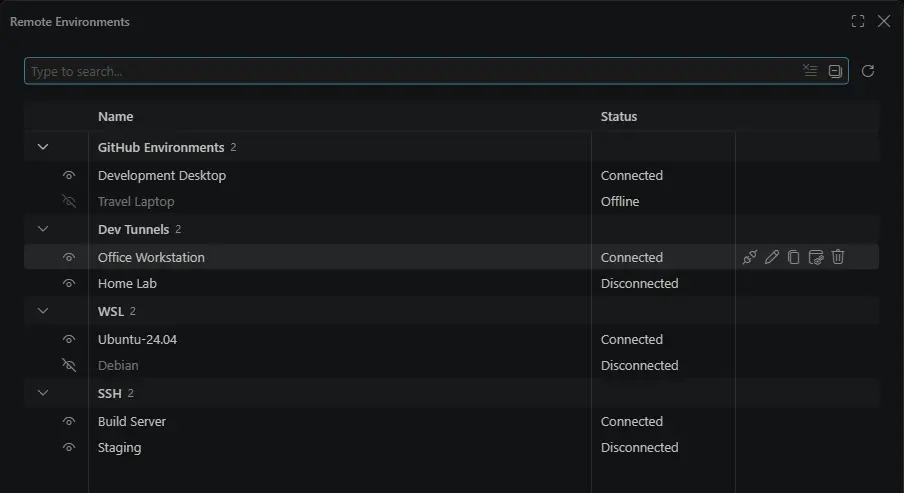
Image: Microsoft — Visual Studio Code 1.144 (official release-notes screenshot of the new Remote Environments dialog).
TL;DR: visual studio code 1.144 explained: Microsoft shipped VS Code 1.144 as the stable release on 28 October 2026, turning the editor into an AI agent command centre. Agent sessions now keep running after you close the editor, Copilot Fusion picks and orchestrates models for each task, and agents can generate images and — experimentally — operate desktop apps.
📌 KEY HIGHLIGHTS
- The release: Visual Studio Code 1.144.0, stable, released 28 October 2026 alongside GitHub Universe 2026.
- Session continuity: a separate Agent Host process keeps agent sessions alive locally or remotely, so closing VS Code no longer kills a running agent.
- Agent Host Protocol 1.0: an open protocol that lets a session started in VS Code continue in the Copilot app, on github.com, in the mobile app or via the Copilot CLI.
- Copilot Fusion goes GA: pick an effort level (Standard, High or Max) and Copilot routes and orchestrates models per task; High and Max need Pro+, Max, Business or Enterprise.
- Also new: image generation in chat (preview), computer use on desktop apps (experimental), cloud sessions and automations, and a refreshed look and feel.
Visual Studio Code 1.144 explained: what happened?
Microsoft's message for this release is a shift in what VS Code is for. The editor is no longer just where you type code — it is where you coordinate teams of AI agents. The structural change underneath everything is the Agent Host: a separate background process that keeps agent sessions running on your machine or remotely, even when the editor window is closed. From the new Agents window you can manage those sessions across workspaces and environments, and cloud sessions let Copilot tasks run on GitHub's infrastructure without keeping your own computer online.
The Agent Host Protocol (AHP) 1.0 is the open standard behind that continuity. Microsoft built it with its Language Server Protocol experience in mind, and it ships libraries in six languages, so third parties can build clients that talk to the same live sessions. A session can move between VS Code, the GitHub Copilot app, github.com, the GitHub Mobile app and the Copilot CLI — start work at your desk, check progress on your phone, and return to the editor to continue.
This is a different story from our separate Copilot Fusion post: that post covers Fusion's pricing and benchmark claims in depth. This post covers the VS Code 1.144 editor release itself — the sessions, the protocol, the controls and the new capabilities that ship inside it.
Copilot Fusion and model comparisons in VS Code 1.144
Fusion is now the hands-off way to choose models. Instead of picking a model for each task, you select Copilot Fusion in the model picker and choose an effort level; Fusion then decides which models to use, how much reasoning effort to apply, and whether one model, a cascade or a critique pattern fits the task. Model comparisons (sometimes called Agent Bake-Off) run the same prompt against several models side by side, and in 1.144 they work without an open project or an existing Git commit — though not in Dev Containers.
| Fusion effort level | What it is for | Available on |
|---|---|---|
| Standard | Everyday coding work | All Copilot plans |
| High | More demanding tasks | Pro+, Max, Business, Enterprise |
| Max | The most complex tasks | Pro+, Max, Business, Enterprise |
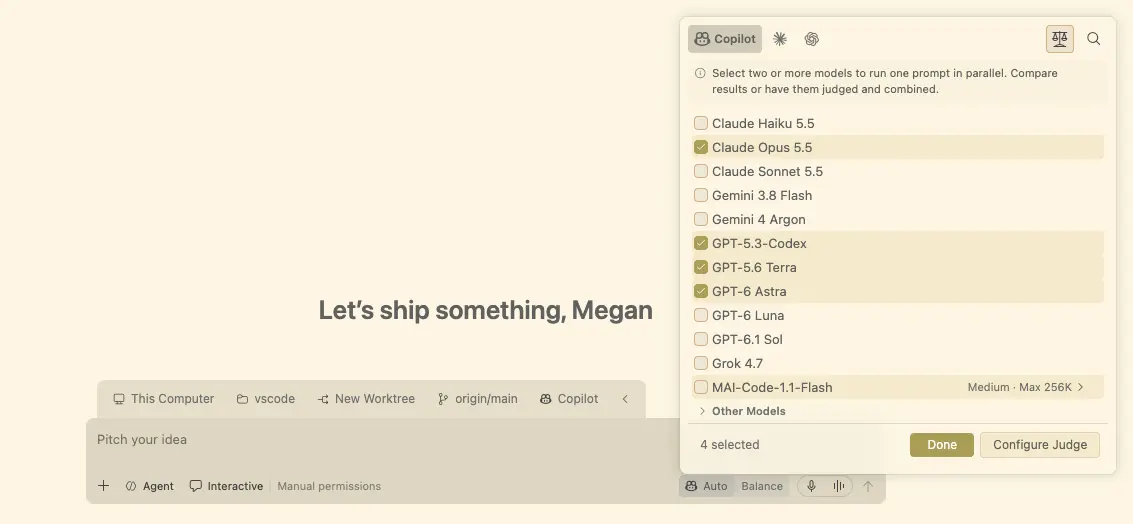
Image: Microsoft — Visual Studio Code 1.144 (official release-notes screenshot of the model comparison picker).
On billing, the honest detail matters: you are charged for each model Fusion invokes at that model's standard rate, so a multi-model task can cost more than a single-model one. Paid Copilot plans receive a 30% discount on Fusion model costs through 30 November 2026.
Computer use, image generation and canvases
Two headline capabilities carry preview or experimental labels, and the labels are worth respecting. Image generation (preview) lets agents create or edit images directly in chat using GPT Image 2.5 Flare, with an optional visible "Made with AI" watermark. Computer use (experimental) lets agents see and control apps on your own macOS or Windows machine — for tasks that live in desktop apps rather than code or the terminal — but only in Copilot harness sessions, and only after you allow it; the agent asks before taking control.
Canvases, introduced in 1.142, get easier to find and manage in 1.144: shared, interactive surfaces where you and the agent inspect and update the same artifact. Assisted permissions are now generally available for Copilot sessions — an LLM risk assessment auto-approves low-risk tool calls while riskier ones still ask you first. And the Copilot harness is now the default for new sessions, with Claude Code and Codex harnesses available as alternatives under a Copilot subscription.
Why it matters for World Tech readers — and what it means for India
For developers everywhere, the practical change is about long-running work. Until now, an agent session was tied to an open editor window; 1.144 unties it. A task can run in the cloud while your laptop is off, an automation can triage issues when you are assigned them, and a session can hand off between devices. That is genuinely useful — and it raises the stakes on permissions, which is why assisted permissions and the sandbox controls matter as much as the flashier features.
For India, there is no India-specific announcement — no local pricing or partnership — but the relevance is direct: India has one of the world's largest developer communities, and VS Code is free, so the editor upgrade itself costs nothing. The costs to watch are the Copilot plans behind Fusion, cloud sessions and image generation, which are billed per model and per credit. Students and freelancers on free or basic plans still get the session-management and editor improvements; the most expensive agent features stay behind paid tiers.
Should you care?
✅ Care if you already use Copilot in VS Code — session continuity, Fusion and assisted permissions change daily workflows immediately. ⏳ Wait if you were hoping for a free lunch on agent costs: the editor is free, but Fusion's multi-model work, cloud sessions and image generation run on paid plans and credits, so pilot them before making them a team default.
Price, availability and how to update
Visual Studio Code 1.144 is available now as a free download for Windows, macOS and Linux from code.visualstudio.com; if you already have it installed, use Check for Updates. Cloud sessions require a paid Copilot plan and are subject to organisation policies, and computer use works on your own macOS or Windows machine in Copilot harness sessions. The Fusion 30% discount for paid plans runs through 30 November 2026. Read it alongside our GitHub Copilot Fusion generally available explainer for Fusion's pricing and benchmark detail, and our Android Studio Rabbit 2 bring-your-own-agent explainer for how Google's IDE answered the same agent-first shift the same week.
FAQs
What is new in Visual Studio Code 1.144? The headline changes are agent session continuity via the Agent Host, the open Agent Host Protocol 1.0, generally available Copilot Fusion, image generation in chat (preview), computer use for desktop apps (experimental), cloud sessions and automations, and a refreshed look and feel.
What is the Agent Host Protocol? It is the open protocol VS Code uses to communicate with its agents locally and remotely, including for cloud automations. Because it is open and ships libraries in six languages, sessions can continue across VS Code, the Copilot app, github.com, the mobile app and the Copilot CLI, and third parties can build compatible clients.
What is Copilot Fusion in VS Code 1.144? Fusion is a model-picker setting that routes each task to one or more AI models automatically. You choose an effort level — Standard, High or Max — and Fusion picks the models, reasoning effort and execution pattern; you are billed per model used, with a 30% discount for paid plans through 30 November 2026.
How do I update to VS Code 1.144, and is it free? VS Code itself is free: download 1.144 from code.visualstudio.com or use Check for Updates in your installed copy. Agent features such as Fusion, cloud sessions and image generation require a Copilot plan and, for some features, a paid tier.
Takeaway: VS Code 1.144 is the release where the editor stops being a window you keep open and becomes a control room for agents that keep working without it — free to install, but with the serious agent features priced behind Copilot plans.
Follow World Tech on TechByCountry for tomorrow's update.
📸 Get tech in the last 24 hours on Instagram — follow @_techinlast24hrs for daily posts (9 AM–9 PM) and reels at 12:30 PM & 8:30 PM.
Sources
- Microsoft — Visual Studio Code 1.144 release notes (28 Oct 2026)
- Visual Studio Magazine — VS Code 1.144 unleashes Copilot Fusion, AI image generation and computer use (28 Oct 2026)
- NTCompatible — Visual Studio Code 1.144 ships: Microsoft turns editor into an AI agent command center (28 Oct 2026)
- Unite.AI — GitHub makes Copilot Fusion generally available at Universe 2026 (28 Oct 2026)
Comments
Post a Comment