VS Code 1.143 Copilot Default Explained: Model Bake-Off, On-Device AI and 4x Faster Chats (World Tech)
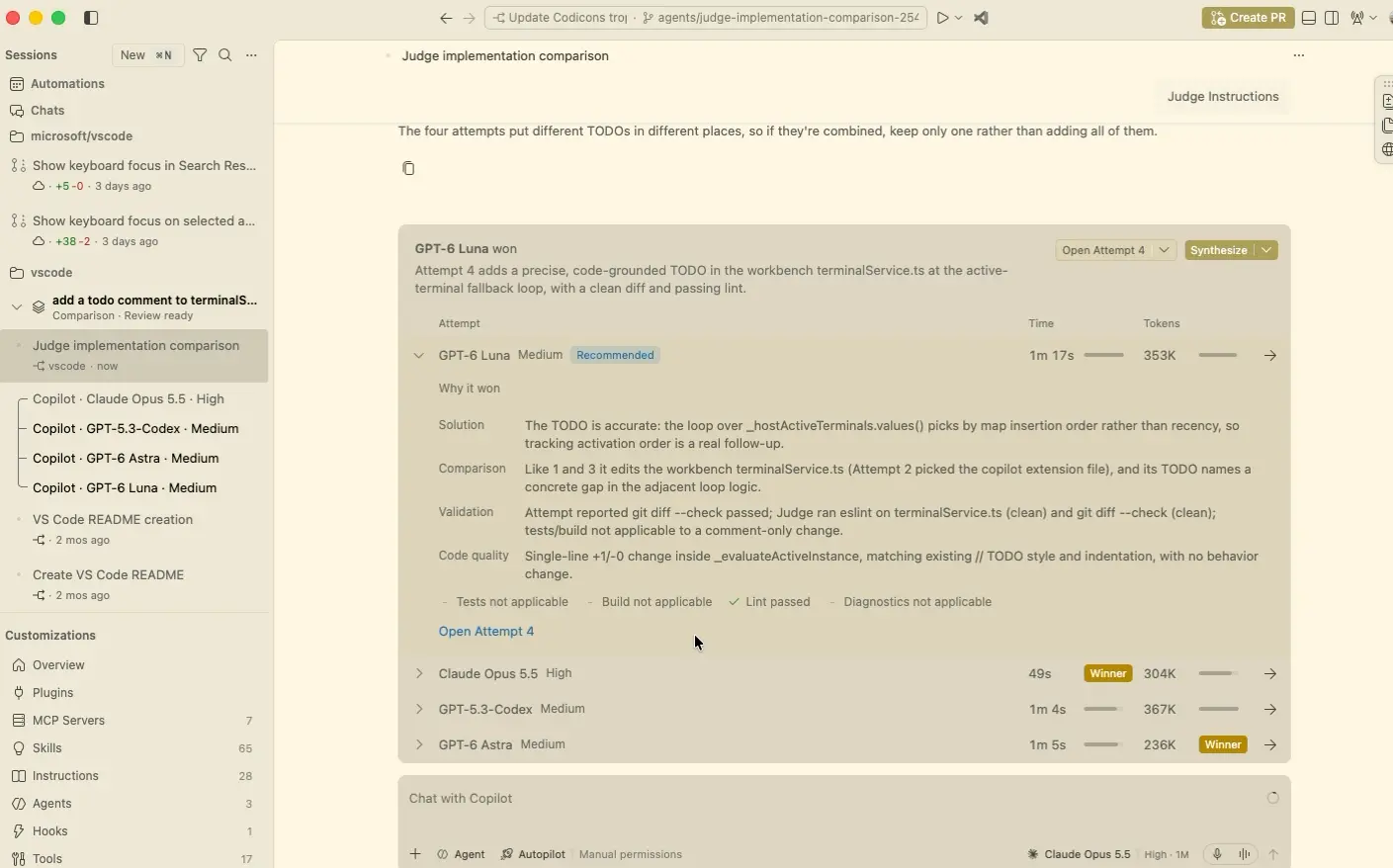
Image: Microsoft — VS Code 1.143 model comparison scorecard (official product image)
📌 KEY HIGHLIGHTS
- Copilot harness by default: new agent sessions now run on the Copilot SDK-based harness and Agent Host runtime — background sessions that sync between the editor and the Agents window, no opt-in needed.
- Compare Models (Preview): run one prompt against two or more models (Copilot, Claude, Codex harnesses), view side-by-side attempts, let an optional Judge model score them, then Synthesize the best ideas into one solution.
- On-device models (Experimental): download MAI Code 1.1 Flash from the new "On This Device" tab and run it locally — responses are labeled On-device and use zero GitHub AI credits.
- Reclaim worktree storage (Experimental): the new Chat: Open Worktree Cleanup command lists inactive agent worktrees by size and age so you can delete what you no longer need.
- Faster giant chats: restoring a ~530 MB chat history drops from 35.6s to 9.0s cold open; the longest UI freeze falls from 28.3s to 0.6s.
VS Code 1.143 Copilot Default Explained: What Actually Changed
Microsoft shipped Visual Studio Code 1.143 to the Stable channel on October 21, 2026 (with a 1.143.1 patch already following to fix launch issues). The release is the next beat in a cadence that has gone nearly weekly this year — and its central theme is AI agents becoming the default way to code, not an opt-in experiment.
The biggest change is the Copilot harness becoming the default for new agent sessions. The harness is built on the Copilot SDK — Microsoft's shared foundation for agent behavior across Copilot products — and sessions run through the Agent Host process introduced earlier this year. Practically, that means a session you start in the editor keeps running in the background and is reachable from the dedicated Agents window, surviving folder closes and window switches. If your company administers VS Code, note the flip side: organizations can now enforce the Copilot harness and disable new Claude and Codex sessions under policy (existing sessions keep working).
The update also fixes a real annoyance when working with the Copilot harness: an experimental file-level working set (setting chat.editor.workingSet.enabled) lets you mark files as reviewed with a Keep action. Files stay on disk and pop back into the working set if the agent touches them again; file-level Undo is planned next. The Agents window's Changes view can now also discard agent edits from the Branch Changes, Session Changes and Last Turn Changes changesets — Session Changes reverts only the agent's edits while keeping yours.
The Model Bake-Off: Stop Guessing Which AI Is Better
Which model actually writes the best version of this helper? VS Code 1.143's most eye-catching preview answers that directly. Enable sessions.chat.compareAgents.enabled in the Agents window, pick Compare Models in the model picker, select two or more models (Copilot, Claude and Codex harnesses can be mixed, with different reasoning levels per attempt), and fire one prompt — every attempt runs in its own session.
Then the fun part: an optional Judge model evaluates every attempt and recommends a winner, showing a scorecard with time and token usage, expandable rationale, validation evidence and links to each attempt. Hit Synthesize and VS Code builds on the recommended attempt using ideas from the others — synthesis only runs when you ask for it. It is the first time a mainstream editor has baked head-to-head model comparison and judged synthesis into the workflow, and it makes model selection an empirical question instead of a hunch.
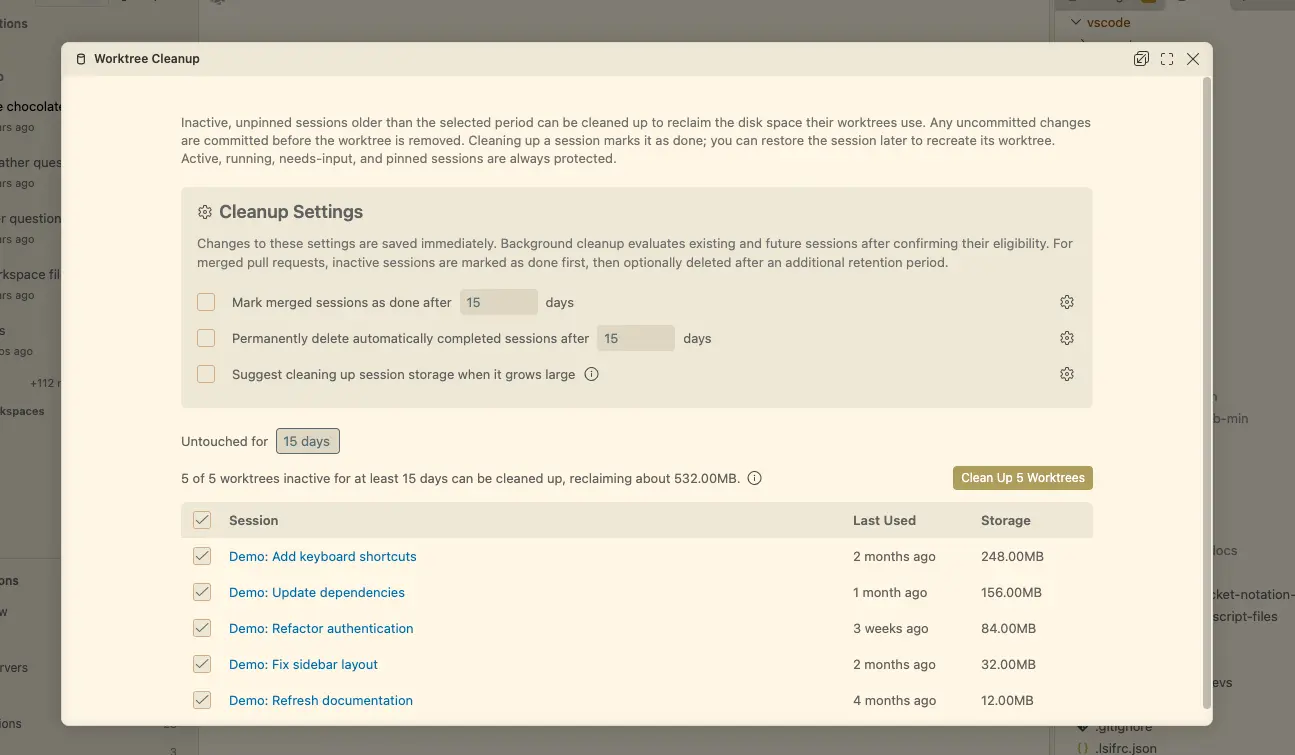
Image: Microsoft — VS Code 1.143 worktree cleanup tool (official product image)
On-Device AI That Doesn't Spend Your Credits — With a Catch
Yes, you can now run a real coding model on your own hardware inside VS Code — and Microsoft says responses generated on-device do not consume GitHub AI credits. The experimental On-device models feature downloads Microsoft's MAI Code 1.1 Flash from a new On This Device tab in the model picker; VS Code manages the download and labels on-device answers accordingly. You can also switch Auto routing on so suitable requests go to the local model with cloud fallback.
Now the catch, and it is a big one: on-device models require GitHub sign-in and an NVIDIA GPU with at least 96 GB of GPU memory, plus a compatible llama.cpp build with llama-server configured (chat.copilot.localModel.enabled). Microsoft's own example is a workstation-class machine with up to 128 GB of unified memory. For virtually every laptop developer, this is a preview of the future, not a feature to enable on Monday — but the direction is clear: your credits stay untouched when the silicon is yours.
New in 1.143: Every Headline Feature at a Glance
| Feature | Status | What it does |
|---|---|---|
| Copilot harness as default | Stable default | New agent sessions run on the Copilot SDK harness via the Agent Host; sync between editor and Agents window |
| Compare Models (bake-off) | Preview | Same prompt across Copilot/Claude/Codex harnesses; optional Judge model scores and Synthesize merges attempts |
| On-device models (MAI Code 1.1 Flash) | Experimental | Local inference, zero AI credits; needs GitHub sign-in + NVIDIA GPU ≥96 GB + llama.cpp |
| Reclaim worktree storage | Experimental | Command Palette: Chat: Open Worktree Cleanup — review and delete inactive agent worktrees by size/age |
| Large-chat performance | Stable | 530 MB chat cold open: 35.6s → 9.0s; longest freeze: 28.3s → 0.6s (Microsoft medians, macOS) |
| Bring your own voice model | Preview | Use your own OpenAI API key + live model (e.g. gpt-live-1) in Voice Mode instead of the hosted backend |
| Multi-diff file list | Experimental | File list alongside the multi-file diff editor for jumping between changed files |
| Sandbox certificate trust | Stable (Win/mac) | Manage CA trust installation, rotation and removal for sandbox credential proxies |
Should You Update Right Now?
Price, Availability and How to Get It
VS Code 1.143 is a free update for Windows, macOS and Linux — the 1.143.1 patch is already in the update channel fixing early issues. Already installed? Use Check for Updates in VS Code. New installs come from the official VS Code site. The Copilot harness default needs no setting change; the Preview features need their opt-in settings (sessions.chat.compareAgents.enabled for the bake-off, the working-set and worktree flags for the rest). Voice Mode BYOK needs agents.voice.enabled plus an OpenAI API key. Want to compare against a Copilot CLI flow too? Microsoft made installing the Copilot CLI easier in this release, including a Windows installer option.
FAQs
What is the Copilot harness in VS Code 1.143?
It is the AI-agent runtime built on the Copilot SDK — a shared foundation for agent behavior across Copilot products. In 1.143 it becomes the default for all new agent sessions; sessions run through the Agent Host, keep working in the background, and are reachable from both the editor and the Agents window.
How do I compare AI models in VS Code 1.143?
In the Agents window, enable sessions.chat.compareAgents.enabled, choose Compare Models in the model picker, select two or more models (Copilot, Claude and Codex harnesses can be mixed), and enter one prompt. An optional Judge model scores the attempts and you can Synthesize the best ideas into one solution.
Can VS Code 1.143 run AI models locally without using GitHub AI credits?
Yes — the experimental on-device models feature downloads Microsoft's MAI Code 1.1 Flash and runs it locally through the Copilot harness, and on-device responses do not consume GitHub AI credits. But you need GitHub sign-in, an NVIDIA GPU with at least 96 GB of memory, and a configured llama.cpp build.
Is VS Code 1.143 a free update and how do I get it?
Yes, it is free for Windows, macOS and Linux, including the 1.143.1 patch. If VS Code is already installed, use Check for Updates; otherwise download the latest build from the official site. Preview features are opt-in via settings.
Takeaway: VS Code 1.143 is the release where Microsoft's agent strategy stops being a suggestion — Copilot harness by default, empirical model bake-offs, credit-free local inference and much faster giant chats make it the most practical update this year for anyone coding with AI. Update now; turn on the previews that matter to you.
Follow World Tech on TechByCountry for tomorrow's update.
📸 Get tech in the last 24 hours on Instagram — follow @_techinlast24hrs for daily posts (9 AM–9 PM) and reels at 12:30 PM & 8:30 PM.
Sources
- Visual Studio Code 1.143 — official release notes, Microsoft (primary source)
- VS Code 1.143 Makes Copilot Default, Adds AI Model 'Bake-Off' and Local AI Without Credits — Visual Studio Magazine, Oct 21 2026
- Visual Studio Code 1.143 Copilot Default, On-Device Models, and More — NT Compatible
- VS Code 1.143: Copilot Harness Default, Compare Models, and Other Updates Worth Knowing — DEV Community, Oct 23 2026
Related reading on TechByCountry: GitHub Copilot Default Policy for New Features Explained — how Copilot rolls out new AI capabilities by default; Cloudflare TSRs: Rust TypeScript Compiler Explained — the experimental 8x-faster compiler incubated with VoidZero; Visual Studio 2026 18.11 Update — the full IDE's latest agent features.
Comments
Post a Comment