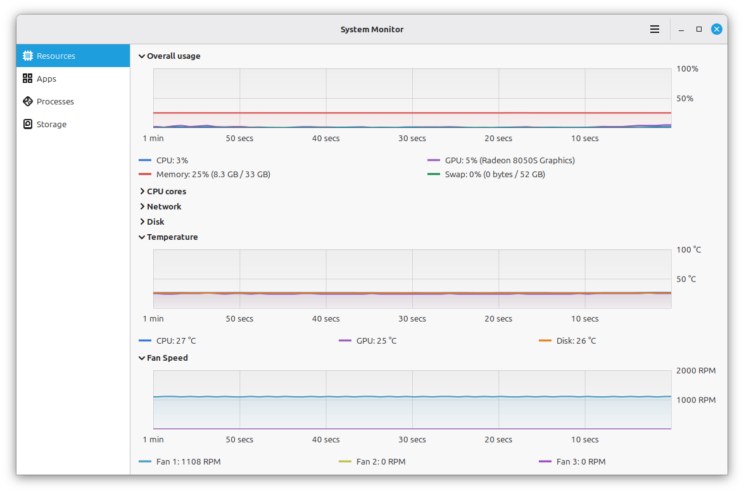
Image: Linux Mint — Superlight (official preview screenshot from the Linux Mint Blog, October 2026).
TL;DR — Linux Mint 27 Adrien new apps explained in one line: the October 2026 Mint update previews three brand-new apps — Superlight, Velocitty and Unfold — plus the return of hibernation, all planned for Linux Mint 27, due around Christmas 2026.
📌 KEY HIGHLIGHTS
- Three new apps: Superlight (system monitor), Velocitty (terminal) and Unfold (archive manager) are all in development for Linux Mint 27, codenamed "Adrien".
- Hibernation returns: Mint is bringing back hibernation with a dedicated Sleep Modes page, plus Hybrid Sleep and Suspend-then-Hibernate — after Ubuntu dropped it from its sleep options.
- Nemo gets a preview pane: the file manager gains an F7 preview pane for audio, pictures and video, with media metadata like capture date and camera model.
- Preview, not final: the Mint team stresses these features are still being worked on and details may change before release.
- When: Linux Mint 27 is targeted for around Christmas 2026, reportedly built on Ubuntu 26.04 LTS.
Linux Mint 27 Adrien new apps explained: what happened?
On 31 October 2026, the Linux Mint team published its Monthly News update for October, previewing what is coming in the next major release. The headline is a trio of new applications the team is building itself, alongside a long-requested feature comeback. All of it is planned for Linux Mint 27, codenamed "Adrien", which reports put on track for a release around Christmas 2026.
Linux Mint has a reputation as the friendliest first step away from Windows, and these additions fit that brief: tools that show you what your computer is doing, a terminal that is easier to live in, and an archive manager that stays out of the way. None of it is finished yet — the team is explicit that these are previews — but the direction is clear.
The three new apps, side by side
| App | What it does | Standout features |
|---|---|---|
| Superlight | System monitor | Graphs for CPU, RAM, swap, GPU, network, disk I/O, temperature and fan speed; per-app and per-process views; battery history; storage breakdown including Steam games and Flatpak apps |
| Velocitty | Terminal emulator | Tab overview, colour palettes, Firefox-style tab reordering and detaching, shell choice and startup commands, colour-coded tabs for root, remote and running sessions |
| Unfold | Archive manager | View, create and extract archives; built on 7zip and 7zip-RAR, including their encryption formats and password-protected archives |
Superlight is the most substantial of the three. Its App page shows what is running and how much of the system each application is using, its process page offers sortable, reorderable columns that it remembers, and its Storage page starts with a general breakdown and lets you drill into folders, files, Steam games and Flatpak usage to find what is eating your disk.
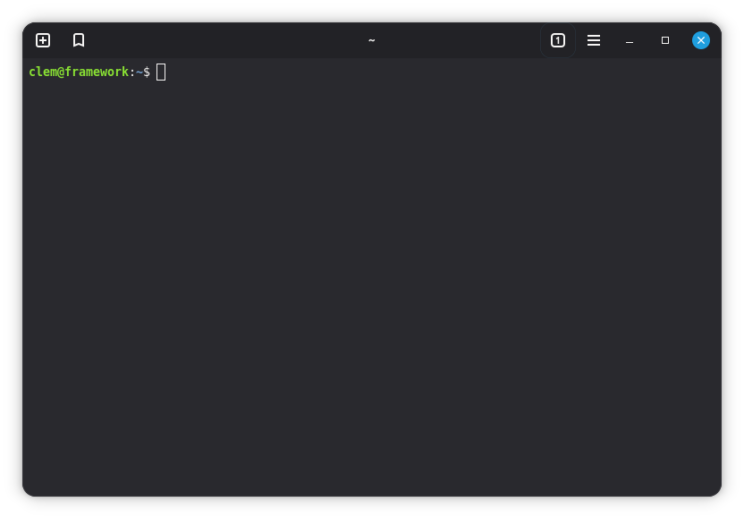
Image: Linux Mint — Velocitty (official preview screenshot from the Linux Mint Blog, October 2026).
Velocitty takes its cues from modern terminals like Ghostty and Ptyxis. Tabs can be reordered within a window, dragged between windows or detached into a new one, just like browser tabs. You can pick your shell, set a startup command — the team's example runs fish with fastfetch at launch — shorten long paths in tab names, and give tabs custom names, colours and commands that open automatically, reachable from a bookmark icon. Tab colours do quiet work too: red for superuser sessions, blue for remote sessions, and a lighter shade when a process is running.
Hibernation returns, and Nemo gets a preview pane
The sleeper hit of the update is literally about sleep. Suspend is fast and well supported, the Mint team notes, but it keeps using power — a laptop left sleeping for days eventually dies with its session gone. Hibernation saves the session to disk and shuts the computer down completely, using no power at all, but it is slow to resume and needs a large amount of swap space. Ubuntu removed it from its available sleep modes, so it was usually unavailable in Mint. Now Mint is bringing it back with a dedicated Sleep Modes page in the System Administration tool, and adding Hybrid Sleep (suspend, but with the session saved to disk as a safety net) and Suspend-then-Hibernate (suspend first, hibernate automatically when the battery goes critical).
The Nemo file manager, meanwhile, gains a preview pane toggled with F7 or a status-bar button. It handles audio, pictures and video and shows metadata for the selected file — in the team's screenshot, when a photo was taken and with which camera.
Why it matters for World Tech readers
Linux Mint is one of the most-installed desktop Linux distributions in the world, and it is the distro many people meet first when they leave Windows. That makes its defaults matter: a clearer system monitor helps newcomers answer "why is my computer slow?", a friendlier terminal lowers the barrier to the command line, and hibernation's return fixes a real laptop annoyance. Our Arch Linux November 2026 ISO explainer covered the opposite end of the spectrum — a distro for people who build their system by hand — while Mint keeps betting that the desktop should explain itself. For existing Mint users, there is a smaller note too: Xenity, a fork of Zenity 3.44, has been added to the Mint 22.x and LMDE 7 repositories, with Cinnamon spices migrated to it.
Should you care?
✅ Worth watching, ⏳ not worth reinstalling over yet. Superlight looks genuinely useful and hibernation's return is a real quality-of-life fix, but everything here is a preview for a release still weeks away. If you are already on Mint, wait for the beta; if you are Windows-curious, Christmas is a good moment to look again.
Availability & what to watch
Linux Mint 27 "Adrien" is targeted for around Christmas 2026, and reports say it will be built on Ubuntu 26.04 LTS. The new apps are previews in active development, so features and even names could shift before the final release — the team says it will share more about them in the coming weeks on the Linux Mint Blog. Our LibreOffice 26.2.7 explainer is a reminder of the other end of the open-source calendar: the current Mint 22.x line keeps getting its own maintenance updates while Adrien is prepared.
FAQs
When is Linux Mint 27 released? Linux Mint 27, codenamed "Adrien", is targeted for around Christmas 2026, according to reports on the team's October 2026 update. The team has not announced a firm date, and as with any Mint release, the date can move if the software is not ready.
What is Superlight in Linux Mint? Superlight is a new system-monitoring app planned for Linux Mint 27. It graphs CPU, RAM, swap, GPU, network, disk I/O, temperature and fan speed, shows per-app and per-process resource use, tracks battery history, and breaks down storage use including Steam games and Flatpak apps.
What is Velocitty in Linux Mint? Velocitty is a new terminal emulator planned for Linux Mint 27. It offers a tab overview, colour palettes, Firefox-style tab reordering and detaching, a choice of shell and startup command, and colour-coded tabs for root, remote and running sessions.
What is Unfold in Linux Mint? Unfold is a small, simple archive manager planned for Linux Mint 27. It views, creates and extracts archives using 7zip and 7zip-RAR, and supports their encryption formats, including password-protected archives.
TAKEAWAY: Mint's next release is shaping up to be a usability release — clearer monitoring, a friendlier terminal, a simpler archiver and sleep modes that finally respect your battery. Watch the beta, not the preview screenshots, for the final verdict.
Follow World Tech on TechByCountry for tomorrow's 6 PM update.
📸 Get tech in the last 24 hours on Instagram — follow @_techinlast24hrs for daily posts (9 AM–9 PM) and reels at 12:30 PM & 8:30 PM.
Sources
- The Linux Mint Blog — Monthly News, October 2026 (primary source)
- Linuxiac — Linux Mint Previews New Terminal, System Monitor, and Hibernation Support
- OMG! Ubuntu — Linux Mint 27 'Adrien' due this Christmas with MORE new apps
- AlternativeTo — Linux Mint adds new system monitoring and terminal emulation apps; brings back hibernation
Comments
Post a Comment