Image: JetBrains — PyCharm 2026.3 release visual (official image from JetBrains' PyCharm 2026.3 announcement).
TL;DR — PyCharm 2026.3 new features explained in one line: JetBrains released PyCharm 2026.3 on 5 November 2026 with JetBrains Air for running AI coding agents inside the IDE, workspaces that give each Python subproject its own console and terminal, support for Python 3.15 lazy imports, and deeper FastAPI and Pydantic help. The core stays free, with a one-month Pro trial included.
📌 KEY HIGHLIGHTS
- Released 5 November 2026 (build 263.7307.206), as part of JetBrains' 2026.3 IDE wave — the Python IDE's turn after IntelliJ IDEA, PhpStorm and RustRover.
- JetBrains Air is the headline: run Claude Agent, Codex, Gemini, GitHub Copilot, Junie, OpenCode and other ACP-compatible coding agents inside PyCharm, using your own subscriptions — no JetBrains AI subscription required. Junie Lite is free with a JetBrains Account.
- Workspaces for multi-package projects: each subproject gets its own Python console and terminal running in its own environment, so code runs against the dependencies it actually uses.
- Python 3.15 lazy imports are now understood by the editor, so the new syntax keeps full code insight instead of breaking navigation and completion.
- FastAPI dependency graphs (Pro) draw an endpoint's full dependency chain and flag circular dependencies before they crash your app at startup; Pydantic field constraints are now checked as you type.
- Still free at the core: PyCharm's core features, including Jupyter support, are free forever, and every install starts with a one-month Pro trial.
What happened?
JetBrains released PyCharm 2026.3 on 5 November 2026, the Python half of the company's 2026.3 release wave. The same wave has already brought IntelliJ IDEA 2026.3 for Java and Kotlin developers and PhpStorm 2026.3 for PHP developers, all built around the same new layer: JetBrains Air, a workspace for running AI coding agents inside the IDE.
PyCharm is JetBrains' IDE for Python — the language behind a huge share of India's student projects, data-science work, automation scripts and Django and FastAPI backends. This release is not a rewrite of the IDE. It is a focused update: one big new capability (Air), one workflow fix for teams with several packages in one repository (workspaces), and framework support that tracks the newest Python itself.
PyCharm 2026.3 new features explained: JetBrains Air
Air is a new layer inside PyCharm for agentic development — work where an AI coding agent does multi-step jobs, such as implementing a feature or refactoring a module, while you supervise. Instead of copying code into a chatbot, you run the agent inside the IDE, where PyCharm's understanding of your codebase helps it make fewer wrong turns, and you review every change before it ships.
The important design choice is that Air is open, not locked to one vendor. It works with Claude Agent, Codex, Gemini, GitHub Copilot, Junie, OpenCode and any other agent that supports the Agent Client Protocol (ACP). It detects agents already installed on your machine so you can connect them in a click. Your existing setup carries over: provider subscriptions, API keys and even a custom base URL all work, with no JetBrains AI subscription required, and you can switch between subscriptions mid-session.
If you have no agent subscription at all, Air includes free AI through the Junie Lite configuration — you only need a JetBrains Account. That matters for students and self-taught developers: the agent layer is usable without paying for a model subscription.
Reviewing is where Air differs from a plain chat window. An agent's changes appear with the surrounding code and your project tools in view, and you can send feedback straight back to the agent — anchoring a note to a specific line in the diff, or commenting directly from the code. You can work in the chat or the terminal, whichever suits you, and even bring Figma designs in as context through Figma Connect.
One migration note: if you still use the older AI Assistant, a notification will offer you a trial of Air. Moving to Air hides AI Assistant, and JetBrains says the move migrates your IDE skills, MCP configuration, ACP agents, authentication and chat history — except chat-mode history. JetBrains has published steps for going back.
Workspaces: one console and terminal per subproject
The biggest everyday change is for anyone whose repository holds several Python packages — a monorepo with a web API, a worker service and a shared library, for example. Until now, the console or terminal could silently use one package's dependencies while you were editing another's.
Workspaces fix that by giving each subproject its own Python console and terminal, running in that subproject's own environment. In uv workspaces, the console uses the workspace environment and adds the subproject root to sys.path. Right-click a subproject and choose Open in Python console, or open a terminal while a subproject file is in the editor, and you are working in that subproject's environment. You can also add a new subproject or convert an existing folder from the Project tool window, initialised with uv, Hatch or Poetry.
Python 3.15 lazy imports and the new interpreter widget
Python 3.15, released in October 2026, adds a lazy import syntax that postpones loading a module until code first touches it — a real startup-time win for scripts and services with heavy dependencies. PyCharm 2026.3 now parses and resolves lazy imports like regular ones, so you can adopt the syntax without giving up code insight on the names you import. If you want the full picture of what Python 3.15 changed, read our Python 3.15 upgrade explained.
The status-bar Python interpreter widget has also been rebuilt around the tools that manage your environments — uv, Poetry, Hatch and conda. It detects the ones installed on your machine and lists the environments each one manages for your project, including environments created from the command line. A Recreate Environment action rebuilds the current environment with a different Python version, and PyCharm offers to download that version if it is not installed.
Around these headline items sit smaller additions: a Home window for editing standalone files, full SQLAlchemy ORM support, automatic copying of project configuration into new Git worktrees, and remote development directly from the IDE via SSH.
FastAPI and Pydantic: deeper framework support
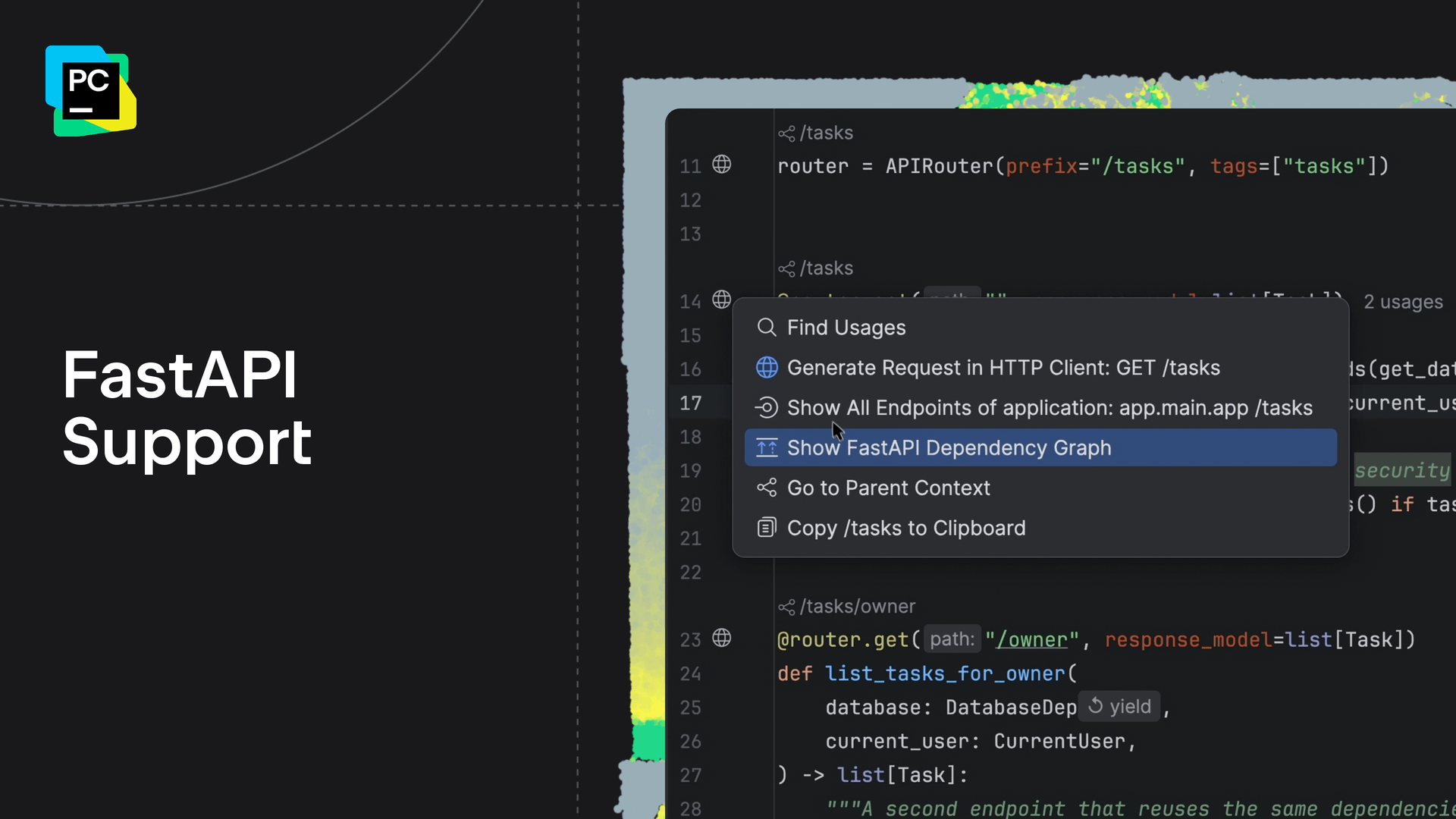
Image: JetBrains — the FastAPI dependency graph in PyCharm 2026.3 (official screenshot from JetBrains' PyCharm 2026.3 announcement).
FastAPI developers on the Pro edition get the most visual new feature. An endpoint can depend on a chain of Depends() and Security() calls spread across many files; PyCharm now draws that chain as a graph for any endpoint. Each dependency is marked as yield or return, and circular dependencies — which raise a RuntimeError at startup — are flagged in the editor before you ever run the app. The graph works in reverse too: a dependency shows which endpoints rely on it.
Pydantic support goes deeper at the same time. PyCharm now reads field constraints, validators and configuration from a model's declaration and uses them across the editor: values passed to a model are checked against its Field() constraints, such as min_length, max_length, gt and lt, with a warning when one is broken; a field name inside @field_validator('price') now resolves to that field's definition; and code completion suggests configuration options such as validate_by_name and validate_by_alias.
| Feature | What it does | Who benefits most |
|---|---|---|
| JetBrains Air | Runs ACP coding agents inside the IDE with diff review and your own subscriptions | Developers already paying for Claude, Codex or Copilot |
| Workspaces | Per-subproject console and terminal in the right environment (uv, Hatch, Poetry) | Teams with multi-package monorepos |
| Python 3.15 lazy imports | Editor understands the new lazy import syntax with full code insight | CLI tools and services with heavy imports |
| FastAPI graphs (Pro) | Visual dependency graph per endpoint; flags circular dependencies | FastAPI backend developers |
| Pydantic checks | Field constraints validated in the editor; validators resolve to fields | API and data-validation code authors |
| Interpreter widget | Environments grouped by their manager; recreate with another Python version | Everyone juggling uv, conda and Poetry |
Why it matters for India readers
Python is the first language for a huge number of Indian learners — college students, career switchers and data-science aspirants — and PyCharm is one of the two IDEs most of them meet first. Two things in this release lower the cost of entry: the core of PyCharm is free forever, including Jupyter support, and Air's Junie Lite tier means the agent features work without a paid model subscription. A student can try agentic coding with only a JetBrains Account.
For working developers, the practical wins are concrete. FastAPI and Django power a large share of Indian startup backends, so the dependency graph and Pydantic checks target code Indian teams actually write. Lazy-import support matters for the CLI tools and serverless functions where Python startup time is felt, and workspaces solve a real monorepo headache for teams that keep several services in one repository.
There is also a security footnote worth knowing: JetBrains says the 2026.3 release includes its fix blocking the compromised eMudhra intermediate certificates, after researchers showed their private keys had been exposed. If you held off updating because of that incident, 2026.3 is the version that carries the fix.
Should you care?
✅ Verdict: update if you write Python most days — Air is genuinely useful if you already pay for a coding agent, and the workspace and framework fixes are free quality-of-life wins. If you only open PyCharm occasionally, there is no rush: nothing here breaks old projects, and the free core means you lose nothing by waiting for the first patch release.
Price, availability and how to update
PyCharm 2026.3 (build 263.7307.206) is available now for Windows, macOS and Linux. It is a single unified product: all users start with a free one-month Pro trial, after which you can subscribe to Pro or keep using the core features for free — Jupyter support included. Existing Professional users are unaffected and keep full access to Pro features.
To update, open Help | Check for Updates on Windows or Linux (PyCharm | Check for Updates on macOS), accept the patch and restart the IDE. If you installed through the Toolbox App, snap, Homebrew or winget, update through that tool instead. A fresh install comes from the PyCharm page on the JetBrains website. Note that the FastAPI dependency graph is a Pro feature — it is included in the trial, then needs a Pro subscription — while Air, workspaces, lazy-import support and the Pydantic checks are in the core release.
FAQs
What is new in PyCharm 2026.3?
The headline is JetBrains Air, a layer for running AI coding agents inside the IDE. It also adds workspaces with per-subproject consoles and terminals, support for Python 3.15 lazy imports, FastAPI dependency graphs on Pro, deeper Pydantic checks, and a redesigned Python interpreter widget built around uv, Poetry, Hatch and conda.
Is PyCharm 2026.3 free?
Yes, at the core. Since PyCharm became one unified product, its essential features — including Jupyter Notebook support — are free forever. A new install starts with a one-month Pro trial; after that you either subscribe to Pro for the advanced features, such as the FastAPI dependency graph, or keep using the free core.
What is JetBrains Air in PyCharm?
Air is PyCharm's workspace for agentic development. It runs coding agents of your choice — Claude Agent, Codex, Gemini, GitHub Copilot, Junie, OpenCode and other ACP-compatible agents — inside the IDE, using your own subscriptions and API keys, with tools to review every change in a diff before it ships. Junie Lite gives you a free agent tier with just a JetBrains Account.
How do I update to PyCharm 2026.3?
Open Help | Check for Updates on Windows or Linux, or PyCharm | Check for Updates on macOS, accept the offered patch and restart the IDE. If PyCharm came through the Toolbox App, snap, Homebrew or winget, update it with that tool instead. A fresh install is available from the PyCharm page on the JetBrains website.
Takeaway: PyCharm 2026.3 is a practical, free-to-try upgrade: Air brings your existing coding-agent subscription into the IDE, workspaces stop the wrong-environment mistake, and the Python 3.15, FastAPI and Pydantic support keeps the editor current with the language. If you write Python daily, update from Help | Check for Updates — and if lazy imports are new to you, start with our Python 3.15 upgrade explained.
Sources
- What's New in PyCharm 2026.3 — The JetBrains Blog (primary source: release announcement, feature details)
- Agents in PyCharm — JetBrains documentation (JetBrains Air details, ACP agents, comparison with AI Assistant)
- PyCharm 2026.3 Released With JetBrains Air, Workspaces and Python 3.15 Lazy Imports — Vinish.Dev (independent summary; confirms 5 November 2026 release date)
- JetBrains review: IntelliJ, PyCharm and Air — Software Lifecycle (unified PyCharm product, free core vs Pro)
- JetBrains blocks eMudhra certificates, update your IDEs — Pasquale Pillitteri (2026.3 includes the compromised-certificate fix)
Comments
Post a Comment