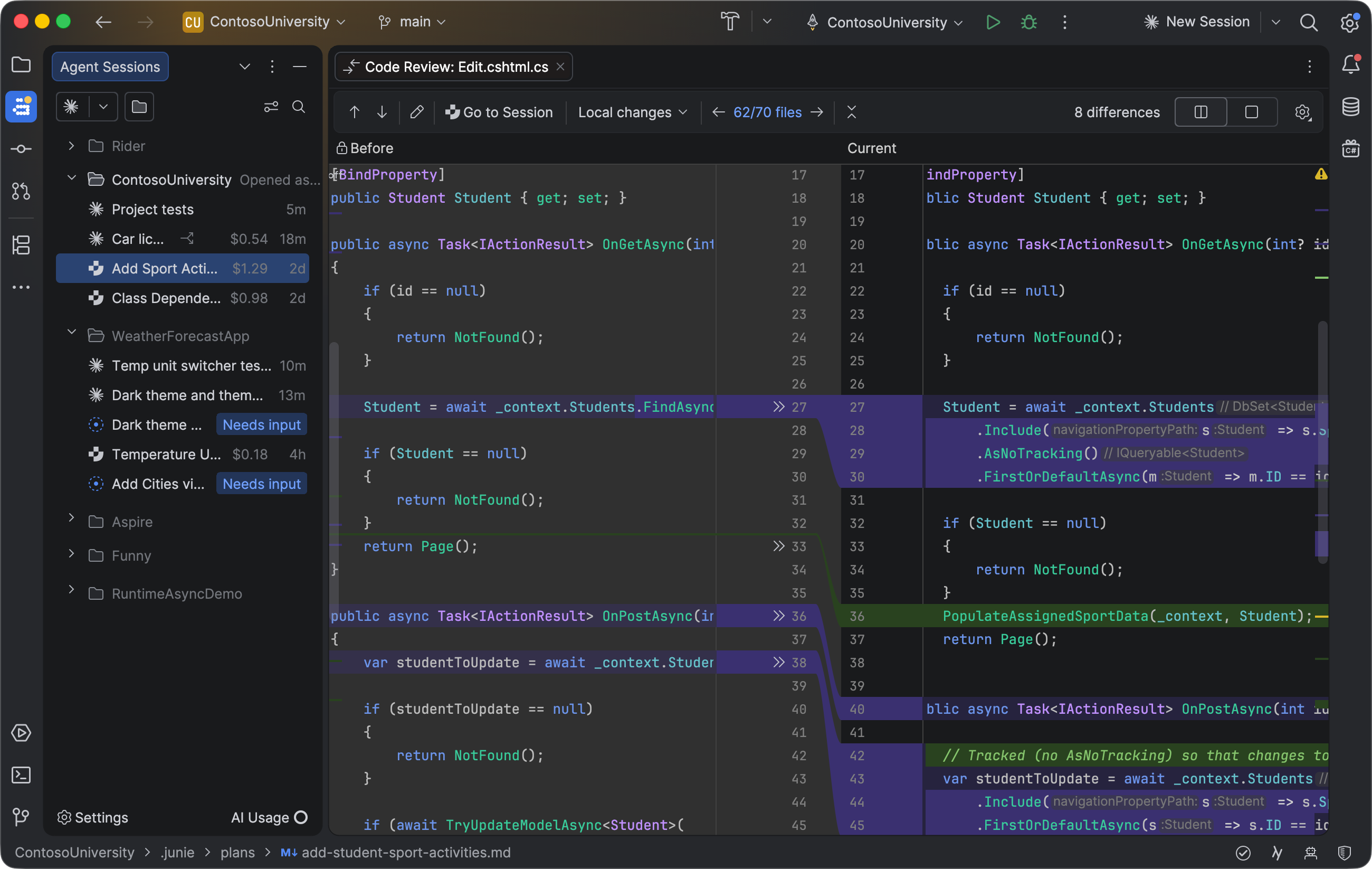
Image: JetBrains — JetBrains Air in Rider 2026.3 (official release image).
TL;DR: Rider 2026.3 new features are led by day-one .NET 11 and C# 15 support, JetBrains Air running coding agents inside the IDE, and professional Godot debugging. Released 10 November 2026, the update is available now and included with an active Rider subscription.
Key Highlights
- Day-one .NET 11 and C# 15 support — unions, closed hierarchies and extension indexers, plus debugging for the runtime's new Runtime Async.
- JetBrains Air now ships in Rider — run, track and review multiple coding agents in parallel, from a new Welcome screen that needs no open solution.
- Agents can now run tests through the Rider MCP server, and Rider copies local project settings into new Git worktrees for parallel agent work.
- Game development: new Lua and Verse plugins, professional Godot debugging with a scene preview, C++ debugger improvements including natvis, and command-line argument presets.
- Everyday editing upgrades from the EAP: rainbow brackets, right-click data breakpoints, a Game Development plugin category and filters in code completion.
Rider 2026.3 new features at a glance
JetBrains released Rider 2026.3 on 10 November 2026, the same day the .NET 11 release itself went live at .NET Conf 2026. It is the third major Rider release of the year, and the timing is the story: instead of making .NET developers wait for a patch, JetBrains shipped full support for the new platform on day one, and used the same release to put its agentic development workspace, JetBrains Air, inside Rider.
That pairing — platform support plus agent tooling — is what separates this release from a routine version bump. The .NET 11 work covers the language, the runtime and the debugger. The Air work changes how the IDE treats AI coding agents: not as one more chat panel, but as sessions you run, steer and review as part of the normal development loop. Around those two pillars sit the game development upgrades and the editing improvements that were tested through the early access programme since September.
| Feature | What it does | Who it helps most |
|---|---|---|
| .NET 11 and C# 15 support | Full toolchain support from day one: unions, closed hierarchies, extension indexers, plus Runtime Async debugging | .NET teams moving to .NET 11 |
| JetBrains Air | Agent workspace that directs, orchestrates and verifies multiple coding agents in parallel, with a new Welcome screen | Developers already using AI coding agents |
| Rider AI skills and MCP | New agent skills; agents run tests through the Rider MCP server; project settings copied into new Git worktrees | Teams letting agents verify their own changes |
| Godot debugging | Professional debugging for GDScript or .NET workflows, with the scene preview inside Rider | Godot game developers |
| Lua and Verse plugins | Language support for two game-scripting languages | Game studios and modders |
| Editing upgrades | Rainbow brackets, right-click data breakpoints, completion filters, TUnit coverage | Every Rider user |
.NET 11 and C# 15 support: ready on day one
The headline language feature in C# 15 is union types: a closed set of case types with implicit conversions and exhaustive switch expressions that the compiler enforces. Rider 2026.3 understands them out of the box, including refactoring tools to create union types, along with closed hierarchies and extension indexers. That matters because union types change how domain models are written — having analysis and refactoring support from the start lowers the risk of adopting a new language feature in production code.
The runtime side is just as important. .NET 11 moves async execution into the runtime itself with Runtime Async, a significant internal change to how async and await run. Rider includes support for debugging code that uses it, so call stacks and breakpoints behave sensibly under the new model. If your services lean heavily on async code, step through a few common paths in Rider after upgrading to see how the debugger presents them before you migrate a whole service.
The timing carries a deadline of its own. .NET 11 is a Standard Term Support release with two years of support, and .NET 8 and .NET 9 reached their end of support on the same day it launched, 10 November 2026. Any production app still on those versions now needs a move to .NET 10, the long-term support release, or to .NET 11 to keep receiving patches. Rider 2026.3 is the IDE-side half of that move: install the .NET 11 SDK separately, then open or create a project and set the target framework.
JetBrains Air in Rider: an agent workspace, not another chatbot
The part of this release most developers will actually feel is Air. JetBrains is careful about what it is not: Air is not an AI provider and it ships with no agents installed. It is a tool window and orchestration layer that detects the coding agents already installed on your machine — Codex, Gemini, GitHub Copilot, Claude Agent, Junie, OpenCode and others that speak the Agent Client Protocol — and lets you run several of them at once, each as a session you can track, steer and review in one place. Our earlier JetBrains Air explainer covers how the workspace works across the JetBrains IDEs.
That matters because the failure mode of agent coding is rarely the code itself; it is losing track of what an agent changed, in which branch, while you were looking elsewhere. Air keeps sessions visible across projects, with their changed files, outgoing commits and costs in one view, and the IDE's own code intelligence — the same engine that resolves types and usages for human-written code — helps agents make fewer wrong turns.
Rider adds one thing the other IDEs in the 2026.3 cycle do not emphasise as much: a new Welcome screen, so you can start working with Air without first opening a solution. That suits quick experiments or tasks that do not belong to one project. One honest limit: Air's early access programme only opened on 1 October 2026, so this is a first stable outing, not a mature product. Expect rough edges, and treat agent output the way you would a junior developer's first pull request — review the diff before it ships.
Agent skills and MCP: agents that can check their own work
Rider 2026.3 adds a number of new agent skills, and agents can now execute tests through the Rider MCP server. That closes a loop that matters more than it sounds: an agent that can run the test suite can check its own changes instead of handing you code it has never seen pass. Combined with the new worktree support — when you create a Git worktree, Rider can carry your local project settings over to it — several agents or reviewers can work on separate branches at once, each with a configured workspace, instead of sharing one half-configured checkout.
The practical advice is the same as for any agent workflow: give the agent a small, testable task first, watch the test run through the MCP server, and only then widen what you delegate. The tooling makes verification possible; it does not make it automatic.
Game development: Godot, Lua and Verse
Rider has long been the JetBrains IDE game developers reach for, and 2026.3 is the strongest game development release in the cycle. The headline is professional debugging for Godot, usable for either GDScript or .NET workflows, including the ability to display your scene's preview inside Rider. The Godot work was tested through the 2026.3 early access programme and ships in the stable release, including completion for unique node names, navigation from code to nodes, Find Usages that includes signal connections made through Callable, and a Remote Scene tree and node inspector while debugging C#.
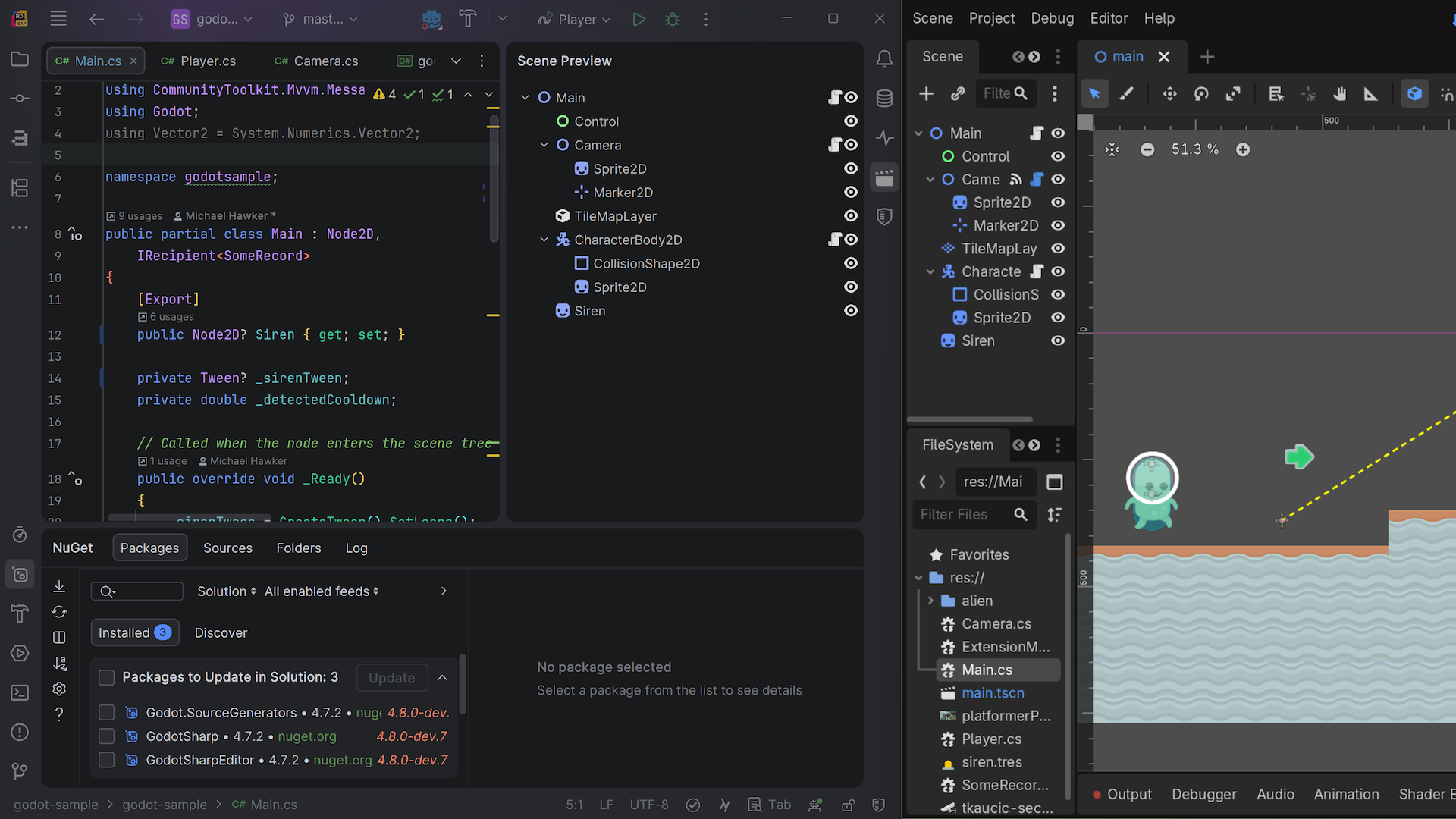
Image: JetBrains — professional Godot debugging in Rider 2026.3, with the scene preview in the IDE (official release image).
Two new plugins add Lua and Verse language support, the C++ debugger improves with natvis support for custom type views, and command-line argument presets make it easier to switch between launch settings. JetBrains has also launched a dedicated landing page for game development with Rider, and the bundled game development plugins — Unity Support, UnrealLink, the Godot plugins and more — now sit in a single Game Development category on the Plugins settings page.
Why it matters for Indian developers
.NET and C# remain a mainstay of Indian IT services, product companies and startups, and Rider is the cross-platform .NET IDE — it runs on Windows, macOS and Linux, which covers the machines Indian development teams actually use. A day-one .NET 11 IDE matters here because Indian enterprise teams tend to adopt new platform releases on a schedule set by their clients, not by their own curiosity: when the client says .NET 11, the IDE has to be ready the same week, not a quarter later.
The Godot side matters too. Godot's zero licence cost has made it the default choice for Indian indie game developers and college game jams, and professional debugging with a scene preview inside the IDE is the kind of tooling that previously pushed small teams toward the paid engines. Lua shows up across game scripting and embedded work, so the new plugin is useful beyond games.
The honest counterweight is price. Rider is a commercial IDE and 2026.3 is included with an active subscription, so for an individual developer the upgrade is a renewal question, not a free download. The free alternative most Indian developers already have is Visual Studio Code with the C# Dev Kit — Rider's case has to be the full IDE: the debugger, the refactoring engine, and now Air's agent workspace. Try it on a branch first if you are mid-release.
Should you upgrade now?
Verdict: ✅ Yes, if you write .NET daily, plan a .NET 11 move, or use AI coding agents or Godot. Day-one .NET 11 support removes the usual waiting period, Air is worth trying on a small task, and the Godot debugging is a genuine step up. ⏳ Wait, if you are mid-release and depend on a plugin that has not been rebuilt for 2026.3 yet — check your essential plugins first, and try the new agent and game features on a branch before committing a whole team.
Price, availability and alternatives
Rider 2026.3 is available to download now from the JetBrains website, included with an active Rider subscription. Install the .NET 11 SDK separately if you want to target the new runtime, then open or create a project and set the target framework. JetBrains lists current pricing and trial options on its site — this post does not quote a price, because subscription pricing changes by region and plan.
The nearest alternatives are the tools developers already compare Rider against. Visual Studio 2026 18.12, released the same day, is the Windows-focused .NET IDE with C++23 complete and its own Copilot chat engine. Visual Studio Code with the C# Dev Kit is the lighter, free editor route, and it is also where JetBrains' own Java and Kotlin support now appears as an extension — the same cross-editor pattern as IntelliJ IDEA 2026.3, which shipped in the same 2026.3 cycle. If you already live in Rider, though, 2026.3 is the release that keeps you current with the platform instead of a version behind it.
FAQs
What is new in Rider 2026.3?
Day-one .NET 11 and C# 15 support with Runtime Async debugging, JetBrains Air running coding agents inside the IDE, new agent skills with test runs through the Rider MCP server, professional Godot debugging, new Lua and Verse plugins, and editing upgrades including rainbow brackets and right-click data breakpoints.
Does Rider 2026.3 support .NET 11 and C# 15?
Yes, out of the box from 10 November 2026. It covers the new C# 15 features — unions, closed hierarchies and extension indexers — with code analysis and refactoring support, and it can debug code that uses .NET 11's new Runtime Async model.
What is JetBrains Air in Rider?
Air is an agentic development workspace, not an AI provider: it ships with no agents installed and instead orchestrates the agents already on your machine — Codex, Copilot, Claude Agent, Junie and others — in parallel sessions you can track and review. Rider's new Welcome screen lets you start Air without opening a solution.
Does Rider 2026.3 support Godot?
Yes. It brings professional debugging for Godot for either GDScript or .NET workflows, including the scene preview inside Rider, plus a Remote Scene tree and node inspector while debugging C#. New Lua and Verse plugins and C++ debugger improvements, including natvis, round out the game development side.
Takeaway
Rider 2026.3 is a platform-timed release: .NET 11 support on day one, Air turning the IDE into an agent workspace, and the strongest Godot story Rider has shipped. If you live in .NET, it is the upgrade that removes the waiting.
If you are moving to .NET 11, install the SDK, update Rider, and step through one async method to see how Runtime Async debugging behaves before you migrate a whole service.
Sources
- JetBrains Blog: Rider 2026.3: .NET 11 Support and JetBrains Air
- JetBrains: What's New in Rider 2026.3
- JetBrains Blog: The Rider 2026.3 Early Access Program Is Open
- JetBrains Blog: From GDScript to GDExtensions: One IDE for Your Godot Code
- Vinish.Dev: JetBrains Rider 2026.3 Released With Day-One .NET 11 and C# 15 Support and JetBrains Air
- Vinish.Dev: Microsoft Releases .NET 11 With C# 15 Union Types, a Faster SDK and EF Core 11
Comments
Post a Comment