
The Flutter logo. Flutter 3.50 shipped on 11 November 2026 alongside Dart 3.14. Image: Wikimedia Commons / RaddP, CC BY-SA 4.0.
TL;DR: Flutter 3.50 new features explained: Google shipped Flutter 3.50 with Dart 3.14 on 11 November 2026. Direct native interop is now stable, WebAssembly runs on Safari and Firefox, and the bundled Material and Cupertino libraries are formally deprecated in favour of standalone packages. Upgrade with flutter upgrade, then run one dart fix command.
Key Highlights
- Release date: 11 November 2026, with Dart 3.14 — 188 contributors, 69 of them first-timers, landed over 1,200 commits.
- Native interop is stable: FFIgen for C and Objective-C and JNIgen for Java and Kotlin are production-ready, so Dart can call native APIs directly without platform channels.
- Material and Cupertino move out: the bundled design libraries are formally deprecated; new projects use the standalone
material_uipackage, and existing apps migrate withdart fix --apply --code=migrate_design_widgets. - Web goes Wasm everywhere: Safari 26.2+ and Firefox 147+ now run Flutter web apps as WebAssembly at over twice the frame rate of the JavaScript build.
- Free speed and safety: iOS touch latency drops by a full frame (16 ms at 60 Hz, 8 ms at 120 Hz), and Android release builds stop trusting Intent extras sent by other apps.
Flutter 3.50 new features explained: what shipped on 11 November
Flutter 3.50 arrived on 11 November 2026, Google's fourth stable release of the year after 3.41 in February, 3.44 in May and 3.47 in August. It ships with Dart 3.14, and the cycle landed more than 1,200 commits from 188 contributors, 69 of them contributing for the first time. It is a direction-setting release rather than a widget grab-bag: native code without platform channels, web apps on WebAssembly in every major browser, and the UI libraries moving out of the SDK into versioned packages.
It has been a big week for developer tools generally — .NET 11 new features landed on 10 November with C# 15 union types, and Visual Studio Code 1.146 new features arrived the same week — but for cross-platform mobile and desktop teams, Flutter 3.50 is the release that changes daily work. The Flutter 3.47.8 security fix in late October was the last patch of the previous cycle; 3.50 is the new baseline.
Native interop is stable at last
For years, calling native code from Flutter meant platform channels: serialising messages, string-based plumbing and a mandatory asynchronous hop for every call. Flutter's direct native interop work removes that layer. In 3.50, FFIgen for C and Objective-C and JNIgen for Java and Kotlin are stable, so Dart code can call native platform APIs directly — including synchronously, or from background isolates — with generated, type-safe bindings instead of hand-written boilerplate.
Pigeon, the tool many plugin authors already use to define an API once, gains a preview native-interop mode that uses both generators under the hood and handles data conversion and native lifetimes automatically on iOS, macOS and Android. The practical effect is simple: plugins that wrap a native SDK get simpler and faster, and teams that avoided native code because of the boilerplate have one less reason to.
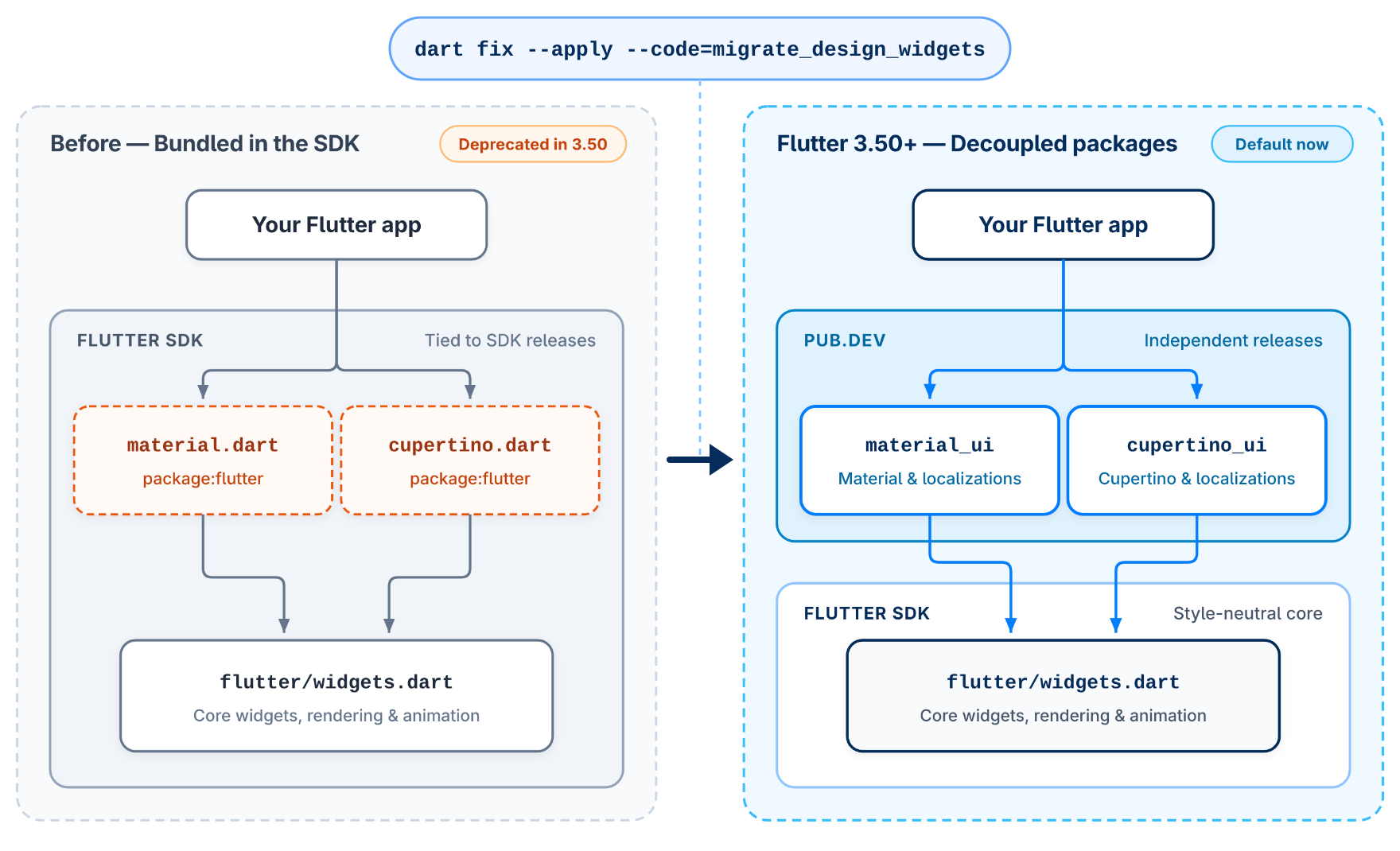
Flutter 3.50 formally deprecates the bundled Material and Cupertino libraries in favour of standalone packages on pub.dev. Image: Flutter team / Google (official Flutter 3.50 announcement).
Material and Cupertino leave the SDK
The change most existing apps will feel first is the one in the diagram above. The standalone material_ui and cupertino_ui packages reached 1.0 in Flutter 3.47; in 3.50 the bundled package:flutter/material.dart and package:flutter/cupertino.dart libraries are formally deprecated, along with their localisation delegates in flutter_localizations. New projects created with flutter create already import package:material_ui by default.
Existing apps keep working for now — deprecated is not removed — but the direction is clear: the design libraries are now versioned packages, not part of the SDK, so they can evolve on their own schedule. Migration is one command: dart fix --apply --code=migrate_design_widgets. Run it, then check the official migration guide for the MaterialUiCompatibilityBridge where your app needs a compatibility shim.
| Area | Before 3.50 | In Flutter 3.50 |
|---|---|---|
| Material / Cupertino | Bundled inside the SDK | Standalone material_ui / cupertino_ui packages; bundled libraries deprecated |
| Native interop | Platform channels, preview generators | FFIgen (C, Objective-C) and JNIgen (Java, Kotlin) stable |
| Flutter web | WebAssembly on Chromium browsers only | WebAssembly on Safari 26.2+ and Firefox 147+ too |
| iOS touch | Frame built on the next vsync | Frame built in the same refresh — 16 ms faster at 60 Hz |
| Android release builds | Accepted Intent extras from any app | Ignores route, entrypoint and engine extras from other apps |
Faster everywhere: web, iOS and Android
On the web, flutter build web --wasm compiles your app to both WebAssembly and JavaScript, falling back automatically on older browsers. Chromium browsers have run the Wasm build by default since Chrome and Edge 137; in 3.50, Safari 26.2+ and Firefox 147+ join them, delivering over twice the frame rate of the JavaScript build on heavy widget benchmarks. You opt in today with a wasmAllowList in your bootstrap config, before it becomes the default in a future stable release. A new --web-content-hash flag embeds content hashes into built JavaScript, WebAssembly and asset filenames, so returning users stop getting stale bundles after a deploy. The old JavaScript interop libraries (dart:html, dart:js, dart:js_util, package:js) are deprecated in favour of dart:js_interop and package:web, and --no-deprecated-js-interop fails the build early if anything still uses them.
On iOS, a rework of how the engine schedules frames after touch events — contributed by community member Matej Knopp — delivers a full frame less input latency: 16 ms faster on 60 Hz devices and 8 ms faster on 120 Hz ProMotion displays, verified on hardware going back to the 2015 iPhone 6s. This is also the first stable release since Xcode 27 and iOS 27 shipped, and flutter screenshot works on physical iPhones and iPads again. One deadline matters: the CocoaPods trunk becomes read-only in December 2026, and 3.50 now warns on every Flutter command if you have disabled Swift Package Manager — re-enable it and test your iOS build now. Intel Macs are no longer tested, and the CLI warns once when you build on one.
On Android, release builds now ignore route, dart_entrypoint and cached_engine_id values passed in through external Intent extras, and reject runtime engine flags such as --dart-flags — closing a hole where any installed app could steer your app's launch, while normal deep linking keeps working. New Android projects default to Android Gradle Plugin 9.3.1 and Gradle 9.5.0, with compile and target SDK at API 36 and a minimum of API 24.
Dart 3.14: dart migrate and a new DartPad
Flutter 3.50 ships with Dart 3.14, and its headline is a tool, not a language feature: dart migrate automates SDK upgrades by moving a package forward one minor version at a time — applying the preparatory dart fix changes, bumping the SDK constraint in pubspec.yaml, then optionally applying cleanup fixes that use the new version's features. Preview with dart migrate --dry-run, apply with dart migrate --apply, and jump several versions at once with --target-sdk=3.14.0. It only supports packages whose SDK constraint already requires Dart 3.0 or later.
DartPad gets a re-engineered beta that compiles the Dart compiler, analyzer and pub client to WebAssembly and runs them in your browser, with full language-server support, packages from pub.dev and multiple files. Under the hood, dart2wasm now emits standard WebAssembly exception handling, so Dart web apps run on Chrome 137+, Safari 26.2+ and Firefox 147+, and standalone .wasm binaries run in runtimes like Wasmtime without a JavaScript host. Hardware 128-bit WebAssembly SIMD delivers up to 4x speedups on SIMD benchmarks, and a new rangeEquals method compares byte-buffer slices without allocating. GenKit Dart reaches a stable 1.0 for building agentic apps, and the Flutter community has now passed one million apps published on Google Play.
Should you care?
✅ Upgrade now if you ship Flutter apps: the upgrade is flutter upgrade, the Material migration is one command, and the iOS touch, web and Android security wins are free. ⏳ Hold off on rebuilding production plugins on the new native-interop APIs until the Flutter team's promised dedicated interop post lands, and finish the Swift Package Manager move before the CocoaPods trunk goes read-only in December. This is a framework upgrade, not a rewrite — most apps change imports, not architecture.
How to upgrade to Flutter 3.50
- Run
flutter upgradeand confirmflutter --versionshows 3.50.0 with Dart 3.14.0. - Run
dart fix --apply --code=migrate_design_widgetsto move imports to the standalone Material and Cupertino packages. - Re-enable Swift Package Manager if you disabled it, and test the iOS build before December.
- Run
flutter build web --no-deprecated-js-interopto find legacy JavaScript interop imports. - If your app launches Flutter screens through Intent extras, verify deep links still work in a release build.
FAQs
What is new in Flutter 3.50?
Flutter 3.50, released 11 November 2026 with Dart 3.14, makes direct native interop stable with FFIgen and JNIgen, brings WebAssembly to Safari and Firefox, formally deprecates the bundled Material and Cupertino libraries, cuts iOS touch latency by a full frame, and hardens Android release builds against external Intent extras.
Are Material and Cupertino removed in Flutter 3.50?
No — they are formally deprecated, not removed. The bundled libraries still work, but new projects use the standalone material_ui and cupertino_ui packages. Migrate existing apps with dart fix --apply --code=migrate_design_widgets and check the official migration guide.
How do I upgrade to Flutter 3.50?
Run flutter upgrade, confirm version 3.50.0, then run the dart fix migration command for Material and Cupertino. Re-enable Swift Package Manager for iOS builds, and check the breaking-changes page before your next release.
What is new in Dart 3.14?
Dart 3.14 adds dart migrate for automated SDK upgrades, a re-engineered DartPad beta that runs in the browser with pub.dev packages, standard WebAssembly exceptions, up to 4x SIMD speedups, and stable FFIgen and JNIgen for native interop.
Takeaway: Flutter 3.50 finishes three multi-year moves at once — native interop without channels, WebAssembly on every major browser, and the design libraries as packages. The upgrade is small; the direction is not.
Run flutter upgrade today, then work through the Material migration on a branch — and read the official breaking-changes page before your next release build.
Sources
- What's new in Flutter 3.50 — Flutter blog (official announcement)
- Announcing Dart 3.14 — Dart blog (official announcement)
- Flutter 3.50.0 release notes — Flutter documentation
- What's new in the docs — Flutter 3.50 — Flutter documentation
- Flutter 3.50 and Dart 3.14: Key Changes and Migration Steps — Very Good Ventures
Comments
Post a Comment