Visual Studio Code 1.146 New Features Explained: Inbox Mode, Chat Windows and the Local Harness Deadline
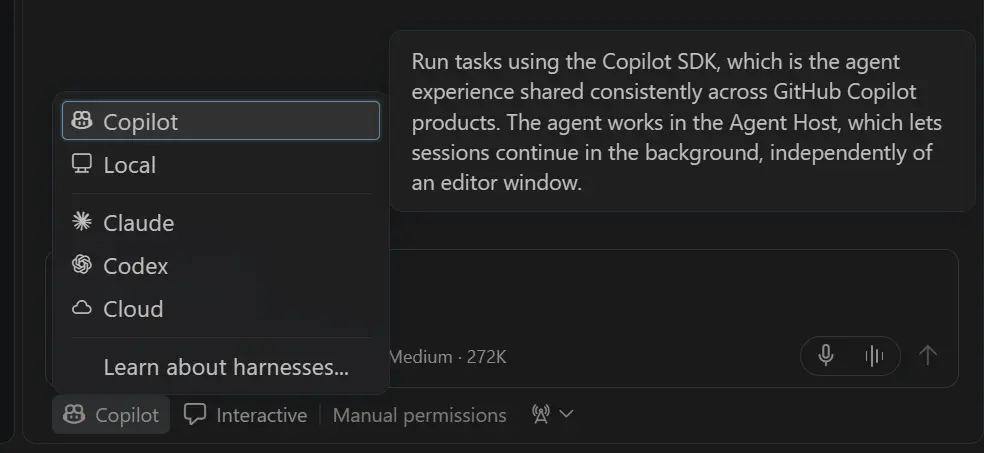
Image: Microsoft — the Copilot harness picker in Visual Studio Code 1.146 (official release-notes screenshot).
TL;DR: Visual Studio Code 1.146 new features explained in one line: Microsoft shipped VS Code 1.146 to the Stable channel on 11 November 2026, adding Inbox mode for triaging agent sessions, chat windows, better model comparison — and starting the three-month countdown to the Local harness being removed in February 2027.
📌 Key Highlights
- The release: Visual Studio Code 1.146.0 reached the Stable channel on 11 November 2026 — a free update for Windows, macOS and Linux.
- Inbox mode (Experimental): one view of every agent session that needs your attention, with snooze, hold and dismiss controls — enable it with
sessions.list.inboxEnabled. - Chat windows (Preview): pull a chat into its own window and arrange the chat, editors and terminals around the task.
- Local harness deprecated: the old agent runtime is frozen now and disappears in February 2027 — move to the Copilot harness before then.
- Safer agents: permission prompts are now granular by default, and sandboxed sessions can mask environment variables such as API keys.
Visual Studio Code 1.146 new features explained: what actually changed
VS Code 1.146 is an agent-era update, not a cosmetic one. Since late 2025, Microsoft has been moving the editor away from a single chat box and toward a persistent agent host — a separate process that keeps AI coding sessions running even when you close the window. Version 1.146 pushes that idea further: the headline features are all about managing many sessions at once, comparing models properly, and tightening the safety rails around agents that can run commands and read files.
It is a Stable release, which matters: Stable is the channel every user gets through the normal update, unlike Insiders builds where features arrive early and unfinished. If VS Code is already installed, the update arrives via Check for Updates; new users download it from Microsoft's VS Code site for Windows (x64 and Arm64), macOS (Universal, Intel and Apple silicon) or Linux (.deb, .rpm, .tar.gz and Snap).
Inbox mode: triage your agent sessions like email
The most practical change is for developers who now run several agents at once. Inbox mode, an experimental feature behind the sessions.list.inboxEnabled setting, gives you one consolidated view of what needs your attention across all your projects — no more opening each workspace to check whether an agent is waiting on you. Sessions that need attention appear at the top, above the Working, Ready to merge, On hold and Done groups. If a session can wait, dismiss it from the inbox, put it on hold, or snooze it — and undo if you change your mind. Dismissing a session does not archive it; to archive it, mark the session as done. A companion experimental setting, sessions.list.inlineActions, adds inline actions to the sessions list so you can fix failing checks and address review comments from the Agents window, without opening the session.
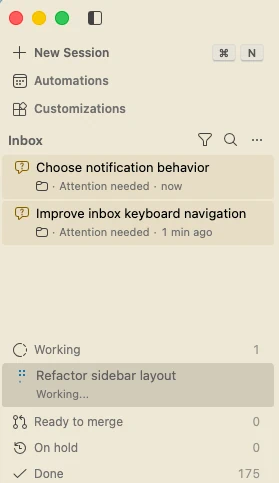
Image: Microsoft — Inbox mode in the Agents window, with sessions needing attention at the top (official release-notes screenshot).
Chat windows and model comparison: shape the workspace, test the models
When several chats run at once, keeping them all in one Agents window means switching between them and losing sight of the one you are waiting on. Chat windows, in Preview behind sessions.chatWindows.enabled, let you open a chat in a window of its own and arrange that window so the chat, its editors and its terminals fit the task — drag parts around, place the terminal under the editor or under the chat, and the window reopens with its chats and editors after you restart VS Code. The setting is on by default in VS Code Insiders and off by default in Stable.
Model comparison also gets easier. Compare Models in the Agents window runs the same prompt across models, evaluates the results with a judge, and combines their strengths with a synthesiser. This release adds judge and synthesiser support for chat-only responses without selecting a workspace, lets you compare Copilot Fusion and its effort tiers, and — experimentally, behind sessions.chat.compareAgents.tools.enabled — lets an agent discover models, launch comparisons and summarise the findings itself. Extensions can now also be found, installed and uninstalled from inside the Agents window, with a warning before you install one that does not declare support for it. And if you work in the terminal outside VS Code, the GitHub Copilot CLI can now hand a session to the editor: type /code in the CLI and VS Code opens the same session with its history, model and permissions intact (needs Copilot CLI 1.0.107 or later, with experimental features on; copilot --resume takes you back).
The Local harness deadline: February 2027
The change with the longest tail is the deprecation of the Local harness. The Copilot harness — built on the Copilot SDK and run through the Agent Host — has been the default for new sessions since VS Code 1.143. It keeps sessions running in the background, works from both the editor window and the Agents window, and enforces managed sandbox and permission policies that the Local harness cannot.
As of 1.146, the Local harness is deprecated and will be removed in three months, in February 2027. For the next three months you can still use it while you move your workflows, but it is functionally frozen: new features will focus on the Copilot harness and are not guaranteed to work on Local. After February 2027, the Local harness will no longer be available, and the enterprise setting that pinned it as the default (vscode.temporaryDefaultToLocalHarness) goes with it. Microsoft publishes a Local-to-Copilot harness transition guide covering customisation compatibility, continuing existing conversations and organisation rollouts. To check which harness you use, look for Copilot in the harness picker when you start a new session — if you still see Local, plan the move now rather than in February.
| Feature | Status | What it means for you |
|---|---|---|
| Inbox mode | Experimental | One triage view for all agent sessions; snooze, hold or dismiss the ones that can wait |
| Chat windows | Preview | Give a chat its own window; rearrange chat, editors and terminals per task |
| Model comparison | Preview | Compare models including Copilot Fusion; an agent can run evaluations for you |
| Copilot harness | Default since 1.143 | Background sessions via the Agent Host; Local harness removed February 2027 |
| Granular permission prompts | Stable | Allowances now cover specific domains, commands and directories — not whole sessions |
| Environment variable masking | Stable | Secrets stay masked in sandboxed sessions; real values go only to approved hosts |
| Copilot CLI handoff | Experimental | /code in the CLI moves a session into VS Code with history intact |
Safer agents: granular permissions and secret masking
Security is where Microsoft is tightening the rails as agents gain real muscle. Permission prompts used to suggest overly broad allowances — the default action for fetching a URL was "Allow in this Session", which let the model access any URL for the rest of the session. Prompts are now more granular by default, adding allowances for specific domains, commands and directories instead. A new setting, chat.agent.sandbox.credentials.envVars, lets you mask environment variables inside sandboxed sessions: sandboxed tools receive placeholders, and the real value is supplied only to approved HTTPS destinations you list. The chat input also shows "(sandbox enabled)" when terminal sandboxing is on. On the same theme, MCP servers can now automatically provide skills to the model (Preview, behind chat.agentHost.mcpSkills.enabled), with an approval the first time a server offers them. For teams, Copilot sessions now follow VS Code's proxy configuration, including PAC and Kerberos, and organisations can point blocked developers at their own help page.
Should you care?
✅ Yes — update when it reaches you, and check which harness your sessions use. Inbox mode and chat windows are the immediately useful parts if you juggle several agents, and the granular permission prompts make the editor safer by default. ⏳ Treat the Local harness deadline as the real action item: if any of your workflows still depend on it, move them to the Copilot harness well before February 2027, while the transition guide and the frozen Local runtime are still available.
Price, availability and how to update
Visual Studio Code is free and open source, and version 1.146.0 is available now from Microsoft's VS Code download pages and via Check for Updates in the editor. The agent features sit on GitHub Copilot, so a Copilot plan is needed for the AI parts; the editor itself costs nothing. If VS Code is already installed, use Help → Check for Updates (on Mac and Windows the auto-update channel delivers it automatically). Linux users download the new package (.deb, .rpm, .tar.gz or Snap) from Microsoft's VS Code site. If you are coming from the previous monthly release, our Visual Studio Code 1.145 update explained covers the remote-agent previews and cron automations that 1.146 builds on, and Visual Studio Code 1.144 explained covers the Agent Host itself. JetBrains users can compare with Rider 2026.3, which shipped the same week with its own agent layer, JetBrains Air.
FAQs
How do I update Visual Studio Code to 1.146?
If VS Code is already installed, use Help → Check for Updates; on Mac and Windows the auto-update channel delivers it automatically. Linux users download the new package (.deb, .rpm, .tar.gz or Snap) from Microsoft's VS Code site.
What is Inbox mode in Visual Studio Code 1.146?
Inbox mode is an experimental view in the Agents window that shows every agent session needing your attention across all projects, grouped into Working, Ready to merge, On hold and Done. Enable it with the sessions.list.inboxEnabled setting, then choose Grouping → Inbox Mode in the sessions list; you can snooze, hold or dismiss sessions that can wait.
What happens to the Local harness in Visual Studio Code?
The Local harness is deprecated in VS Code 1.146 and will be removed in February 2027. It stays usable but functionally frozen until then, while the Copilot harness — the default since 1.143 — becomes the only option. Microsoft publishes a transition guide for moving customisations and existing conversations.
Is Visual Studio Code 1.146 free?
Yes. Visual Studio Code is free and open source, and the 1.146 update costs nothing on Windows, macOS and Linux. The AI agent features run on GitHub Copilot, so a Copilot plan is needed for those parts, but the editor and the update itself are free.
Takeaway
VS Code 1.146 is the release where the agent workflow grows up: Inbox mode and chat windows help you manage many agents at once, model comparison helps you pick the right one, and the safety controls get tighter just as agents get more power. The headline to act on is the February 2027 Local harness removal — check your harness picker today, and move before the deadline forces the issue.
Update VS Code now via Help → Check for Updates, then enable Inbox mode and see which of your agent sessions actually need you — and if you still use the Local harness, read Microsoft's transition guide before February 2027. For the previous month's changes, see our Visual Studio Code 1.145 update explained.
Sources
- Microsoft Visual Studio Code — "Visual Studio Code 1.146" release notes (11 November 2026, primary source): code.visualstudio.com/updates/v1_146
- NT Compatible — "Visual Studio Code 1.146 Deprecates the Local Agent Harness by February 2027" (11 November 2026): ntcompatible.com
- GitHub Changelog — "GitHub Copilot in VS Code, Universe releases" (28 October 2026): github.blog
Comments
Post a Comment