
Image: JetBrains — RustRover 2026.3 (official release image).
TL;DR — RustRover 2026.3 new features explained in one line: JetBrains shipped its Rust IDE's 2026.3 update on 5 November 2026 with JetBrains Air for running coding agents inside the IDE, a debugger MCP server that lets agents debug your code, clearer debugger and profiler views, and native SSH remote work — a free update for current subscribers, and free for non-commercial use.
📌 Key Highlights
- Released 5 November 2026: JetBrains announced RustRover 2026.3 on its official blog — the third major RustRover release of 2026, focused on understanding code at runtime.
- JetBrains Air is now built in: run and review coding agents — Claude Agent, Codex, Gemini, GitHub Copilot, Junie and OpenCode — inside the IDE, using your existing subscriptions and API keys. No JetBrains AI subscription is required.
- Agents can now debug: a new debugger MCP server plus a
rustrover-debuggerskill lets an agent set breakpoints, step through code and inspect variables on your behalf. - Debugger and profiler are easier to read: long Rust type and symbol names are shortened in debugger views, and profiler results now jump straight to the right Rust function.
- Remote work and platform updates: work on remote machines over SSH with native OpenSSH, a Ghostty terminal by default, sound cues for finished tasks, and automatic error reporting you can switch off.
RustRover 2026.3 new features explained: what happened?
JetBrains released RustRover 2026.3 on 5 November 2026, announcing it the same day on the official JetBrains blog. RustRover is JetBrains' dedicated IDE for the Rust programming language — it entered public preview in 2023 and shipped as a full product in 2024 — and 2026.3 is its latest major update.
The theme of this release is runtime: the work of understanding what your code actually does when it runs. Most of the headline changes sit in the debugger and profiler, and the biggest new capability — JetBrains Air — is about letting AI coding agents take part in that runtime work instead of only writing code from a chat panel. The update is available now: update from inside the IDE, through the JetBrains Toolbox App, or download it from JetBrains' website.
The release lands in a busy month for Rust tooling. The Rust language itself got a bug-fix release in late October — see our Rust 1.99.1 FFI bool bug fix, explained — and the Rust-based bundler Parcel reached its 3.0 alpha — see our Parcel 3 alpha Rust bundler, explained. RustRover 2026.3 is the IDE-side half of that same story: the ecosystem is maturing, and the tooling is catching up with how developers actually use AI agents.
JetBrains Air: your coding agents, inside the IDE
JetBrains Air is the headline of 2026.3, and the first thing to get right is what it is not: it is not another AI model, and it is not a new coding agent competing with the ones you already use. It is a workspace and orchestration layer built into the IDE that lets you run, track and review coding agents from one place.
Air works with the agents developers already use, including Claude Agent, Codex, Gemini, GitHub Copilot, Junie and OpenCode, plus any other agent that speaks the Agent Client Protocol (ACP). Your existing subscriptions and API keys carry over, and JetBrains says no JetBrains AI subscription is required. If you have no agent subscription at all, Junie Lite gives you a free agent with just a JetBrains Account, and Junie can also work with models running locally through Ollama or LM Studio.
The review side is where Air earns its keep. When an agent makes changes, you review them with the surrounding code in view rather than as an isolated diff, and you can anchor notes to specific lines in the diff so the agent knows exactly what to fix on its next pass. That matters because agent-written code is only as good as the review it gets — and reviewing a diff without its context is where mistakes slip through.
Air is not brand new: JetBrains launched it as a standalone app in March 2026 and opened an Early Access Program for the in-IDE version on 2 October 2026, covering IntelliJ IDEA, PyCharm, WebStorm, CLion and RustRover. With 2026.3 it graduates from that early-access phase and ships bundled in the stable release.
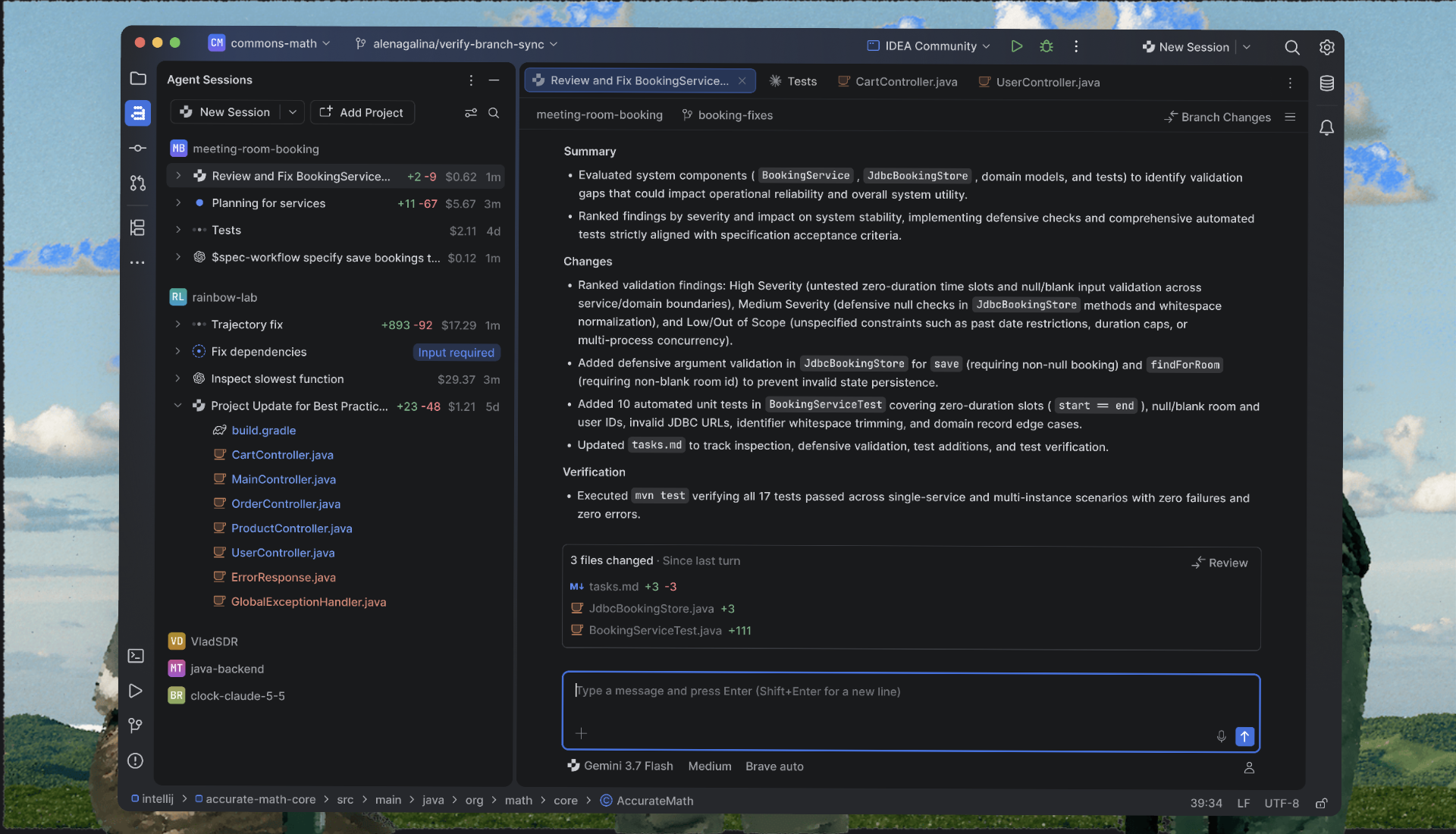
Image: JetBrains — JetBrains Air in RustRover 2026.3 (official screenshot).
The debugger MCP server: agents that debug with you
The most distinctive addition in 2026.3 is a debugger MCP server, paired with a skill called rustrover-debugger that teaches agents how to use it. Instead of stepping through code yourself, you describe the problem in natural language and let the agent collect the runtime evidence: set breakpoints, step through execution, read variables and evaluate expressions.
This helps with the class of bug that is hardest to find from source code and logs alone — a value that is wrong only at runtime, a state that only goes bad under a specific input, a race that never reproduces when you are watching. The agent drives RustRover's regular debugger, so you can follow the session live and take over at any point. To switch it on, enable the MCP server, then enable and install the rustrover-debugger skill for RustRover or your agent of choice; both settings live under Settings | AI.
A word of honest caution: an agent driving your debugger is a powerful assistant, not a replacement for understanding your own code. It can chase a symptom for a long time if the problem description is vague, and its conclusions still deserve a human check before they reach production. Treat it the way you would treat a junior colleague's debugging session — useful, fast, and worth verifying.
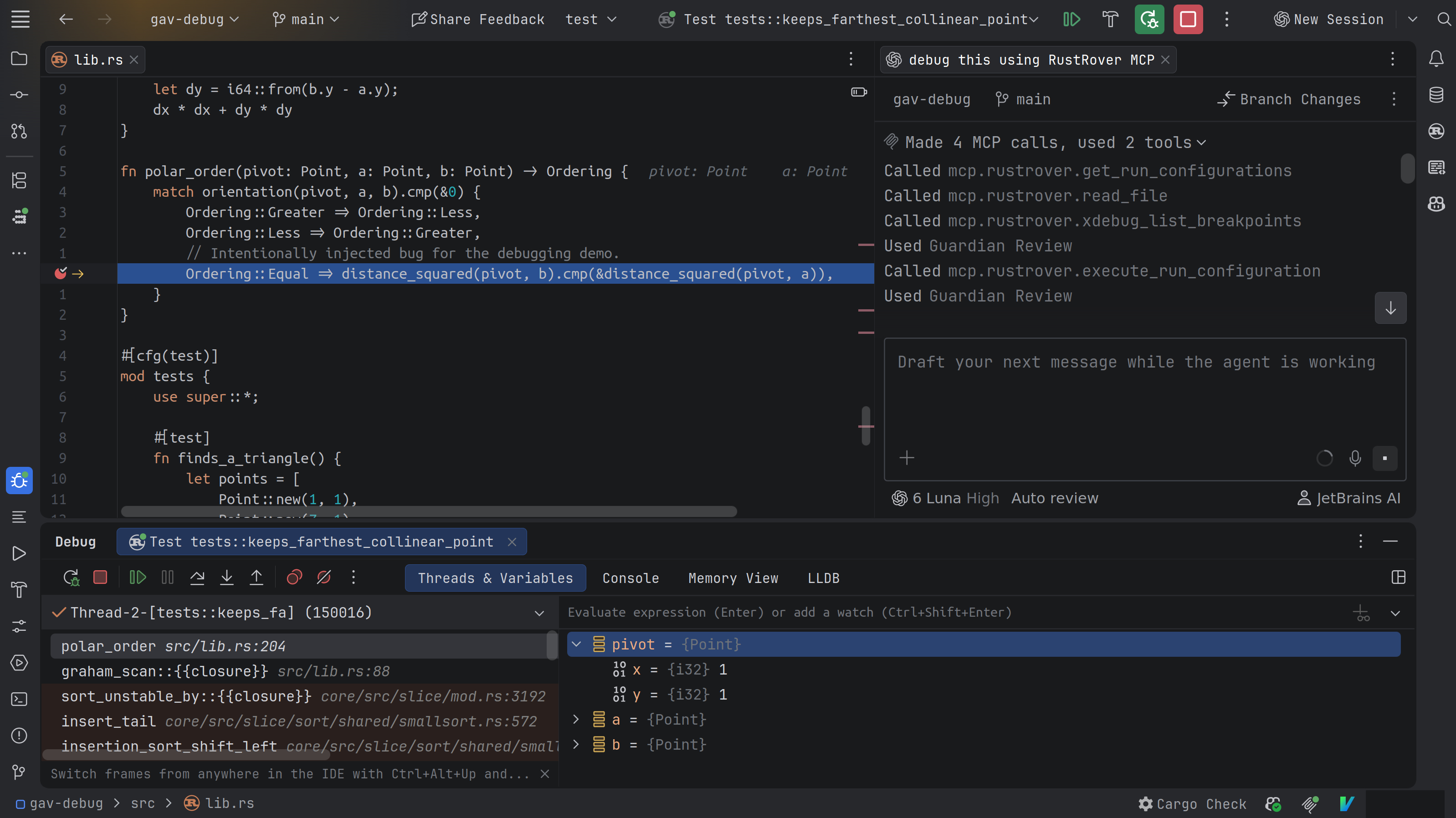
Image: JetBrains — the debugger MCP server in RustRover 2026.3 (official screenshot).
What's new at a glance
| Feature | What changes | Who it helps |
|---|---|---|
| JetBrains Air | Run and review coding agents inside the IDE, using your own subscriptions and API keys | Developers already using AI coding agents |
| Debugger MCP server + skill | An agent can set breakpoints, step through code, inspect variables and evaluate expressions | Anyone debugging hard runtime bugs |
| Shortened debugger names | Long Rust type names shortened in Variables and Watches; symbol names shortened in Frames (on by default, can be switched off) | Everyone reading debugger output |
| Profiler Jump to Source | Opens the Rust function behind a hot spot instead of reporting "Declaration not found"; function names demangled and readable; works with perf on Linux and DTrace on macOS | Performance work |
| Native SSH remote projects | Connect to a remote host, start a session and reconnect later; certificate auth, hardware security tokens such as YubiKey, and ProxyJump | Developers working on remote machines and servers |
| Ghostty terminal by default | The built-in terminal now uses the Ghostty emulator; terminal tabs can open in the editor, next to your code | CLI-heavy workflows and terminal-based agents |
| Sound cues | Sounds when builds, tests and background tasks finish; audio cues for editor line marks for screen reader users | Accessibility and focus |
| Automatic error reports | Error and UI-freeze reports are sent to JetBrains automatically; only technical data is included and personal details are stripped; can be turned off in settings | Faster fixes for crashes and freezes |
Remote work over SSH, Ghostty terminal and platform updates
You can now work on projects hosted on a remote machine directly from RustRover: connect to a host over SSH, start a development session, and reconnect to it later, all from the IDE. RustRover now uses native OpenSSH, so it works with the authentication methods your team already relies on, including certificate-based authentication, hardware security tokens such as YubiKey, and ProxyJump.
The release also carries the IntelliJ Platform updates shared by the whole 2026.3 wave. The built-in terminal now uses the Ghostty emulator by default, for better compatibility with modern CLI tools and terminal-based agents — the same change our JetBrains 2026.3 terminal Ghostty update, explained covered in October — and terminal tabs can now open in the editor, right next to your code. New Git worktrees get a copy of your local project configuration, and installed and Marketplace plugins now appear in a single view. Sound cues play when builds, tests and other background tasks finish, and screen reader users get audio cues for editor line marks.
One change to know about rather than celebrate: RustRover 2026.3 automatically sends error and UI-freeze reports to JetBrains. The company says reports contain only technical data, and that personal details such as file paths, URLs and usernames are removed before they leave your machine. You can turn automatic reporting off in the settings if you would rather not send it.
Why it matters for Indian developers
Rust's footprint in India keeps growing — in backend infrastructure, blockchain and Web3 projects, embedded systems and developer tooling — and the tooling around the language is now moving as fast as the language itself. Two parts of this release matter most from an Indian perspective.
First, cost. RustRover is free for non-commercial use, which covers learning, self-education, open-source contributions and hobby projects — the exact ways most Indian students and early-career developers first meet the language. A 30-day free trial covers the full commercial version for everyone else. JetBrains has announced no India-specific pricing for RustRover, and it bills in US dollars, so check the current price on JetBrains' website before buying rather than relying on any rupee figure quoted elsewhere.
Second, the agent model. Air's bring-your-own-agent design fits how Indian developers already work: many already pay for GitHub Copilot, Claude or Codex, and Air lets them keep that subscription instead of buying a second one from JetBrains. The free Junie Lite tier, which needs only a JetBrains Account, lowers the barrier further for students and hobbyists who want to try agent-assisted development without paying for it.
Should you care?
✅ Update now if you write Rust daily in RustRover — the debugger readability fixes and profiler improvements alone are worth the install, and Air plus the debugger MCP server are genuinely new capabilities to try this week. ⏳ Try it, but don't switch editors for it, if you use VS Code with rust-analyzer and are happy — this release narrows the agent gap rather than creating a must-switch moment. The honest test is a week of real work: if Air's diff review and the agent-driven debugger save you time on your own codebase, stay; if they don't, nothing here forces a change.
RustRover vs VS Code: the quick version
The question every Rust developer asks when a JetBrains release lands is whether it beats the free setup. JetBrains itself published a comparison on 1 October 2026, and the honest summary is that the two setups optimise for different things.
| Area | VS Code + rust-analyzer | RustRover 2026.3 |
|---|---|---|
| Cost | Free — editor and extension | Free for non-commercial use; commercial licence paid; 30-day trial |
| Rust analysis | rust-analyzer language server via extension | JetBrains' own analysis engine, integrated with the Cargo project model |
| Debugging | Needs an extension, such as CodeLLDB | Built in — and now drivable by AI agents through the debugger MCP server |
| AI agents | Inline suggestions, chat and agent tasks in the editor | Air runs Junie, Claude Agent, Codex, Gemini, Copilot and OpenCode via ACP, with in-IDE diff review |
| Best for | A lightweight, free, flexible setup | Developers who want analysis, Cargo, testing, debugging and agents connected in one tool |
Neither side wins outright: VS Code is free and lighter, RustRover is more integrated and now has the stronger agent story. What 2026.3 changes is that the agent story is no longer a reason to pick VS Code — it is a reason to compare the two seriously.
Price, availability and how to update
RustRover 2026.3 is available now from JetBrains' website. Current subscribers get it as a free update; new users can start with the free non-commercial licence or a 30-day trial of the full version. Commercial use needs a paid licence — JetBrains bills in US dollars and has announced no India-specific price, so check the price page at purchase time. Update from inside the IDE, through the JetBrains Toolbox App, or download the new version directly. The 2026.3 wave is rolling out across JetBrains' IDEs, so expect matching Air and platform updates in IntelliJ IDEA, PyCharm, WebStorm and CLion.
FAQs
Is RustRover free?
Yes, for non-commercial use — learning, self-education, open-source work, content creation and hobby projects all qualify for a free licence with the full-featured IDE. Commercial use needs a paid licence, and every new user gets a 30-day free trial of the full version.
What is JetBrains Air in RustRover?
JetBrains Air is an agent workspace built into the IDE — an orchestration layer, not an AI model or an agent itself. It runs coding agents you already subscribe to, such as Claude Agent, Codex, Gemini, GitHub Copilot, Junie and OpenCode, and lets you review their changes with the surrounding code in view. No JetBrains AI subscription is required, and Junie Lite is free with just a JetBrains Account.
How do I update to RustRover 2026.3?
Update from inside the IDE, through the JetBrains Toolbox App, or download the new version from JetBrains' website. If you use the debugger MCP server, remember to also enable and install the rustrover-debugger skill under Settings | AI after updating.
Is RustRover better than VS Code for Rust?
It depends on what you value. RustRover has its own Rust analysis engine, a built-in debugger that AI agents can now drive, and the Air agent workspace; VS Code with rust-analyzer is free, lighter and flexible, but needs extensions for debugging. JetBrains' own comparison puts it this way: RustRover suits developers who want analysis, Cargo, testing, debugging and agents connected through one project model.
TAKEAWAY: RustRover 2026.3 is a debugger-first release with an agent twist — Air and the debugger MCP server let your coding agent help find runtime bugs, not just write code, and the clearer debugger views help whether you use AI or not. Update if you write Rust daily; try Junie Lite first if you are still deciding.
Follow World Tech on TechByCountry for tomorrow's 6 PM update.
📸 Get tech in the last 24 hours on Instagram — follow @_techinlast24hrs for daily posts (9 AM–9 PM) and reels at 12:30 PM & 8:30 PM.
Sources
- JetBrains Blog — RustRover 2026.3 Is Out: JetBrains Air, Clearer Debugger Views, and Agents That Debug With You (5 November 2026)
- Vinish.Dev — RustRover 2026.3 Released With JetBrains Air and a Debugger MCP Server for AI Agents (5 November 2026)
- JetBrains — RustRover: Rust IDE by JetBrains (free for non-commercial use; 30-day trial)
- JetBrains Blog — RustRover vs VS Code + rust-analyzer: Cargo, Debugging, and AI (1 October 2026)
- JetBrains — What's New in RustRover 2026.3
Comments
Post a Comment