
Image: JetBrains — WebStorm 2026.3 release artwork (official JetBrains blog image).
TL;DR: WebStorm 2026.3 new features explained: released on 5 November 2026, the JavaScript and TypeScript IDE adds JetBrains Air for running AI coding agents inside the editor, a Figma-to-browser workflow that keeps design, code and testing in one place, and stable TypeScript 7 support that JetBrains says cut Kibana's project load from about 12 seconds to three.
Key Highlights
- WebStorm 2026.3 was released on 5 November 2026, as part of JetBrains' 2026.3 wave — the frontend IDE's turn after IntelliJ IDEA, PyCharm and PhpStorm.
- JetBrains Air brings agentic development into the IDE: run Claude Agent, Codex, Gemini, GitHub Copilot, Junie or OpenCode in parallel, with IDE-native review of every change.
- Design to production in one window: Figma Connect with an Inspect panel, Storybook Connect, and Chrome DevTools Connect let agents work from a design and check the result in a real browser.
- Stable TypeScript 7 support for React and Angular with no migration — a Go-based engine replaces the Node.js language service.
- Update via the Toolbox App or download it from JetBrains; WebStorm is free for non-commercial use.
What happened?
JetBrains released WebStorm 2026.3 on 5 November 2026. WebStorm is the company's IDE for JavaScript and TypeScript developers, and this release is about the least glamorous part of frontend work: the switching. Building a UI feature with an AI agent, JetBrains argues, usually means more time moving between tools than writing code — copying values out of Figma, hunting for the right Storybook story, writing the prompt, then checking the result in a browser and starting over. WebStorm 2026.3 tries to pull that whole loop inside the IDE, with JetBrains Air as the connective tissue. It is the last of the big 2026.3 IDE releases to land: IntelliJ IDEA, PyCharm and PhpStorm shipped on 5 November and Rider followed on 10 November, all sharing the same headline — Air, JetBrains' new layer for agentic development. WebStorm's version is the most frontend-specific of the wave.
WebStorm 2026.3 new features explained
JetBrains Air: agents run inside the IDE, not beside it
Air is a layer that lets you run coding agents of your choice — Claude Agent, Codex, Gemini, GitHub Copilot, Junie, OpenCode and other ACP-compatible agents — and track, run and verify multi-agent workflows inside WebStorm. You can run several sessions in parallel and review each agent's changes with the surrounding code in view, sending feedback back from a specific line in the diff.
Two details matter practically. First, Air detects the agents already installed on your machine, and your existing setup carries over: provider subscriptions, API keys and even a custom base URL all work, with no JetBrains AI subscription required. Second, Air includes a free AI option — Junie Lite — which needs only a JetBrains Account, so developers without a paid agent subscription can still try agentic workflows.
The design-to-production workflow: Figma, Storybook, browser
Three connected features cover the path from a design file to a working page. Figma Connect, now with an Inspect panel, puts exact CSS values, colours and design tokens from a Figma layer into the IDE — and into an agent's context — so nobody has to retype spacing or hex codes. You can browse Figma layers from WebStorm and send design context to Claude Code, Codex or Cursor, after a one-time setup.
Storybook Connect brings Storybook into the IDE: browse and search stories, jump between a story and its source code, and let AI-assisted tools generate stories for components that lack them — including from the command line, for example webstorm storybook-connect missing-stories ./src/Button.tsx. It ships as a separate plugin and requires Storybook 10 or later.
Chrome DevTools Connect closes the loop. The bundled plugin and CLI skill let an agent test what it builds in a real browser: open pages, inspect the DOM and rendered UI, read console logs and network requests, take screenshots, and reproduce runtime issues to confirm a fix. The first time an agent uses the skill, WebStorm prompts a one-time package install; after that, no extra MCP wiring is needed.
Stable TypeScript 7, and fixes for Angular, Vitest and huge codebases
TypeScript 7 support is now stable in WebStorm, including in Angular and React projects. It swaps the Node.js-based language service for a Go-based engine, so coding assistance has less overhead in large projects — and you can select it without migrating or changing your project's TypeScript version. JetBrains says that on the Kibana codebase, project load time dropped from about 12 seconds to three; that is JetBrains' own measurement, not an independent benchmark.
Around it sit targeted fixes: WebStorm now infers correct template types for Angular in WSL instead of falling back to any; single-test runs work again in Vitest 5; Mocha 12 (ESM) no longer shows a reporter warning; the Tailwind CSS language server works with a remote Node interpreter in Docker on macOS. On performance, Find Usages no longer stalls for minutes in very large monorepos — JetBrains tested it on Kibana, which has more than 1,000 tsconfig files — and an Angular memory leak on TypeScript 7 that JetBrains says caused CPU spikes of 800–900% is fixed.
What 2026.3 changes vs 2026.2
| Area | In WebStorm 2026.2 | In WebStorm 2026.3 |
|---|---|---|
| AI agents | AI chat with Junie, Claude Agent and Codex | JetBrains Air: parallel agent sessions, IDE-native review, free Junie Lite |
| Design to code | Figma Connect and Chrome DevTools Connect arriving | Figma Inspect panel, Storybook Connect, full design-to-browser loop in Air |
| TypeScript | TypeScript 7 support ships | TypeScript 7 stable for React and Angular, no migration needed |
| Performance | Large-monorepo Find Usages stalls; Angular CPU-spike leak | Find Usages fixed on Kibana-scale repos; leak fixed |
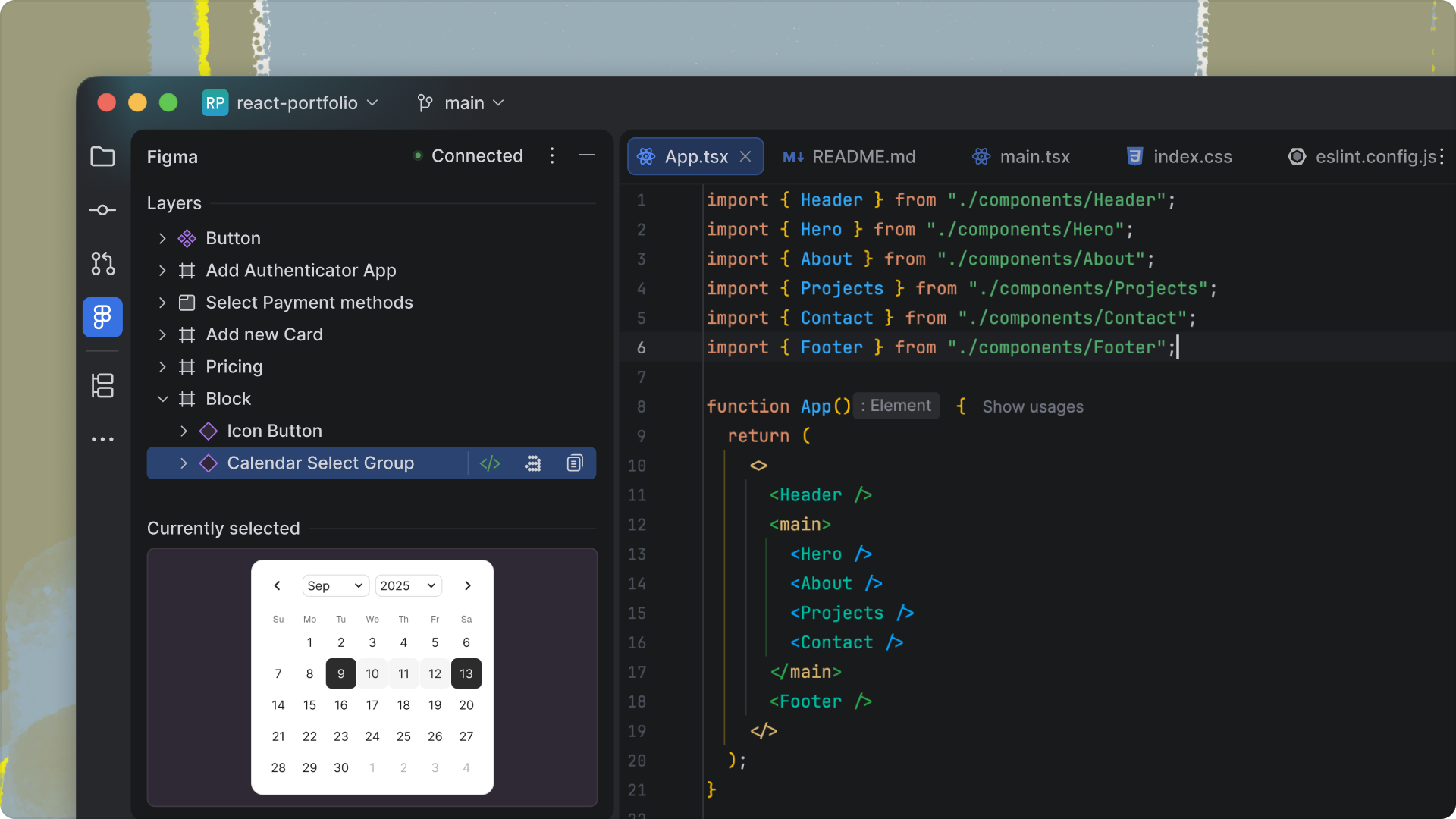
Image: JetBrains — Figma Connect Inspect panel in WebStorm 2026.3 (official JetBrains blog image).
Why it matters for Indian developers
India has one of the world's largest frontend workforces, and much of it works in React and Angular on large, long-lived codebases — exactly the setups where a faster TypeScript engine and a Find Usages that does not stall are felt daily. The Figma-to-code handoff is also a familiar pain point in Indian product teams and agencies, where designers and developers often sit in different teams or cities: exact design tokens in the IDE, rather than screenshots in a chat thread, removes a whole class of "wrong shade of blue" rework.
The free tier matters too. Junie Lite needs only a JetBrains Account, and WebStorm itself is free for non-commercial use, so students and early-career developers can try agentic coding without a paid subscription. One caution: JetBrains prices in US dollars, so the individual plan — from $7.90 a month — costs more in rupees than the headline figure suggests once taxes and conversion are counted, and there is no India-specific pricing.
Should you care?
✅ Yes, if you build frontend apps in WebStorm — TypeScript 7 alone is worth the update, and Air plus the Figma-to-browser loop is the most useful version of AI-assisted frontend work JetBrains has shipped. ⏳ Wait, if your team has standardised on another agent setup — trial Air on a side project first, since it works with your existing agents and subscriptions.
Price and how to update
WebStorm is free for non-commercial use. Individual commercial plans start at $7.90 a month ($79 a year) at JetBrains' current pricing. Update to 2026.3 from inside the IDE via the Toolbox App, or download it directly from the JetBrains website. Note one new default: WebStorm now sends automatic error and UI-freeze reports to JetBrains — technical data only, with file paths, URLs and usernames stripped — and you can turn that off under Settings | Appearance & Behavior | System Settings | Data Sharing. For the rest of the 2026.3 wave, see our IntelliJ IDEA 2026.3 new features explained, PyCharm 2026.3 new features explained and Rider 2026.3 new features explained.
FAQs
What is new in WebStorm 2026.3?
Released on 5 November 2026, it adds JetBrains Air for agentic development, a Figma–Storybook–browser design-to-production workflow, stable TypeScript 7 support for React and Angular, and performance fixes for large codebases.
What is JetBrains Air in WebStorm?
Air is a layer inside the IDE for running AI coding agents — Claude Agent, Codex, Gemini, GitHub Copilot, Junie, OpenCode and other ACP-compatible agents — in parallel, with tools to review every change before it ships. It works with your existing agent subscriptions; no JetBrains AI subscription is required.
Is WebStorm 2026.3 free?
WebStorm is free for non-commercial use, and JetBrains Air includes a free Junie Lite configuration that needs only a JetBrains Account. Individual commercial plans start at $7.90 a month.
How do I update to WebStorm 2026.3?
Update via the JetBrains Toolbox App or download the new build from the JetBrains website. Your existing agents, subscriptions and settings carry over into Air.
Takeaway
WebStorm 2026.3 is a workflow release, not a feature pile: agents, design files, components and the browser now meet in one window, and TypeScript 7 makes the whole thing faster on big projects.
If you write frontend code in WebStorm, update and try the Figma Inspect panel on your next component — that is where the time saving shows up first.
Comments
Post a Comment